public static function ObjectField(obj:
Object,
objType: Type,
allowSceneObjects: bool,
params options: GUILayoutOption[]):
Object;
public static Object ObjectField(Object obj,
Type objType,
bool allowSceneObjects,
params GUILayoutOption[] options);
public static function ObjectField(label:
string,
obj: Object,
objType: Type,
allowSceneObjects: bool,
params options: GUILayoutOption[]):
Object;
public static Object ObjectField(string label,
Object obj,
Type objType,
bool allowSceneObjects,
params GUILayoutOption[] options);
public static function ObjectField(label:
GUIContent,
obj: Object,
objType: Type,
allowSceneObjects: bool,
params options: GUILayoutOption[]):
Object;
public static Object ObjectField(GUIContent label,
Object obj,
Type objType,
bool allowSceneObjects,
params GUILayoutOption[] options);
Parámetros
| label | Optional label in front of the field. |
| obj | The object the field shows. |
| objType | The type of the objects that can be assigned. |
| allowSceneObjects | Allow assigning scene objects. See Description for more info. |
| options | An optional list of layout options that specify extra layout properties. Any values passed in here will override settings defined by the style.
See Also: GUILayout.Width, GUILayout.Height, GUILayout.MinWidth, GUILayout.MaxWidth, GUILayout.MinHeight,
GUILayout.MaxHeight, GUILayout.ExpandWidth, GUILayout.ExpandHeight. |
Valor de retorno
Object The object that has been set by the user.
Descripción
Make a field to receive any object type.
You can assign objects either by drag and drop or by selecting an object using the Object Picker.
Ensure that the allowSceneObjects parameter is false if the object reference is stored as part of an asset, since assets can't store references to objects in a scene.
If the ObjectField is part of a custom Editor for a script component, use EditorUtility.IsPersistent() to check if the component is on an asset or a scene object.
See the example in the Editor class for further information.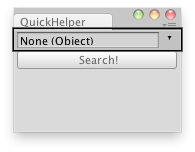
Search for a help page by selecting the GameObject in the Object Field.
// EditorScript that quickly searches for a help page
// about the selected Object.
//
// If no such page is found in the Manual it opens the Unity forum.

import UnityEditor;

class QuickHelper extends EditorWindow {

	var source : Object;

	@MenuItem("Example/QuickHelper _h")
	static function Init() {
		var window : QuickHelper = EditorWindow.GetWindowWithRect(QuickHelper, Rect(0,0,165,100));
		window.Show();
	}

	function OnGUI() {
		EditorGUILayout.BeginHorizontal();
		source = EditorGUILayout.ObjectField(source, Object, true);
		EditorGUILayout.EndHorizontal();

		if(GUILayout.Button("Search!")) {
			if(source == null) {
				this.ShowNotification(GUIContent("No object selected for searching"));
			} else {
				if(Help.HasHelpForObject(source))
					Help.ShowHelpForObject(source);
				else
					Help.BrowseURL("http://forum.unity3d.com/search.php");
			}
		}
	}
}
using UnityEditor;
using UnityEngine;
using System.Collections;

public class ExampleClass : MonoBehaviour {
    public Object source;
    [MenuItem("Example/QuickHelper _h")]
    static void Init() {
        QuickHelper window = (QuickHelper) EditorWindow.GetWindowWithRect(typeof(QuickHelper), new Rect(0, 0, 165, 100));
        window.Show();
    }
    void OnGUI() {
        EditorGUILayout.BeginHorizontal();
        source = EditorGUILayout.ObjectField(source, typeof(Object), true);
        EditorGUILayout.EndHorizontal();
        if (GUILayout.Button("Search!"))
            if (source == null)
                ShowNotification(new GUIContent("No object selected for searching"));
            else
                if (Help.HasHelpForObject(source))
                    Help.ShowHelpForObject(source);
                else
                    Help.BrowseURL("http://forum.unity3d.com/search.php");

    }
}