Spatial Entities Image Tracking feature
Learn how image tracking behaves on the OpenXR Spatial Entities platform, including immutable image databases and runtime library creation.
This page is a supplement to the AR Foundation Image tracking manual. The following sections only contain information about APIs where Spatial Entities exhibits unique platform-specific behavior.
Tip
When developing an AR app, refer to both the AR Foundation documentation as well as the required packages for each platform you support.
Enable Spatial Entities Image Tracking
To configure image tracking in your Spatial Entities project:
- Open the OpenXR section of the XR Plug-in Management settings (menu: Edit > Project Settings > XR Plug-in Management > OpenXR tab).
- Under OpenXR Feature Groups, select Spatial Entities to open the list of Spatial Entities features.
- Enable Spatial Entities: Image Tracking.
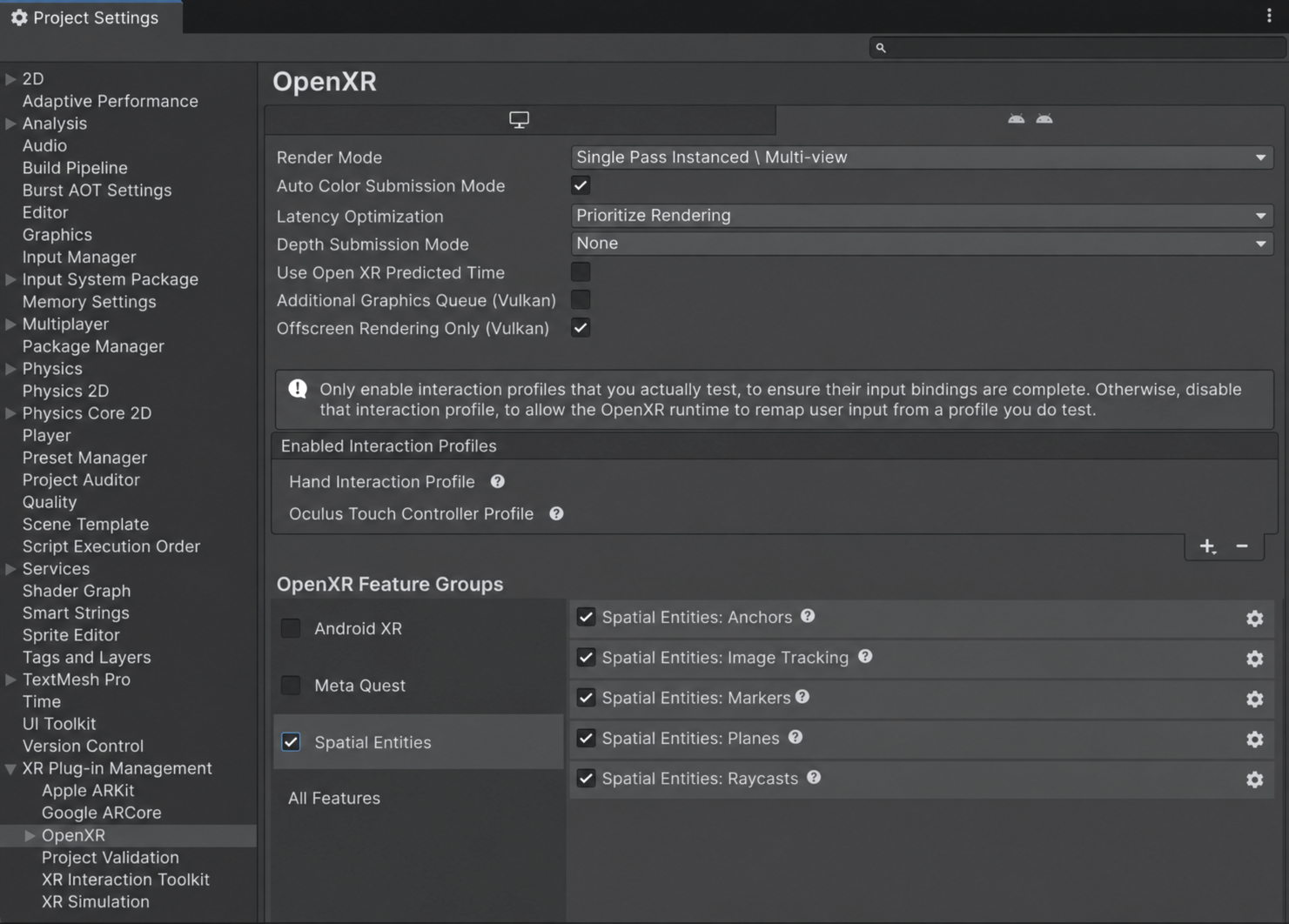
Spatial Entities: Image Tracking feature in Project Settings.
Resolve subsystem conflicts
AR Foundation supports only one enabled image tracking provider at a time. If your project also uses other AR Foundation provider plug-ins, such as the Google ARCore XR Plug-in or Apple ARKit XR Plug-in, disable their image tracking features.
Permissions
Your app can't access any spatial data until the user grants the necessary permissions on their device. Refer to Permissions for more information.
Reference image libraries
AR Foundation uses XRReferenceImageLibrary assets to define the set of images the runtime detects and tracks. On OpenXR Spatial Entities, the provider converts a build-time library into an immutable SpatialImageDatabase. This conversion happens at startup for a library in the manager's Serialized Library field, or when you call ARTrackedImageManager.TrySetReferenceLibraryAsync on the library.
Key differences from other providers
The OpenXR Spatial Entities provider differs from other image tracking providers in the following ways:
- No mutable libraries: OpenXR image tracking databases are immutable after creation. The provider doesn't support MutableRuntimeReferenceImageLibrary. You can't add or remove images from a database after you create it, but you can always create a new database and destroy the old one.
- Empty libraries: As on every other provider, passing
nulltoTryCreateRuntimeLibraryAsyncsucceeds and returns an empty library. The OpenXR runtime can't create an image database with zero images, so the resultingSpatialImageDatabasehas no native database behind it. It stays empty, and assigning it stops image detection and releases the image tracking spatial context.
Create a library at runtime
To build a reference image library at runtime:
- Construct each XRReferenceImage with an XRReferenceImageBuilder.
- Combine the images into a library with XRReferenceImageLibrary.Create.
- Pass the resulting library to TryCreateRuntimeLibraryAsync, which returns a
SpatialImageDatabasewhen invoked on this provider.
Moving image types
The provider supports AR Foundation's MovingImageType enum, which lets you mark individual images and entire image databases as static, dynamic, or unspecified:
| Value | Description |
|---|---|
| Unspecified | The runtime follows its default behavior. |
| Static | Indicates that the image doesn't move. Use for wall art, signs, and other fixed images. |
| Dynamic | Indicates that the image moves. Use for images on portable objects. |
You can set the MovingImageType at two levels:
- Per-library: Set on the
XRReferenceImageLibraryto apply a default to all images in the library. - Per-image: Set on individual
XRReferenceImageentries. A per-image setting of anything other thanUnspecifiedoverrides the per-library default.
Note
OpenXR runtimes might choose not to make use of the moving image type setting. Refer to your runtime's documentation for details on how this hint affects tracking behavior.
Supported texture formats
The OpenXR XR_EXT_spatial_image_tracking specification (not yet part of the public spec) guarantees support for at least two image formats:
RGBA32(RGBA 8-bit per channel)RGB24(RGB 8-bit per channel)
The OpenXR runtime might support additional formats. Use SpatialImageTrackingSubsystem.GetSupportedTextureFormats to query the full set of supported formats at runtime.
Important
By default, Unity imports RGB images in a compressed DXT1 format, which isn't one of the two formats the OpenXR runtime guarantees.
To import a reference image in a format the OpenXR runtime guarantees:
- Select the image asset to open its import settings in the Inspector.
- Set Format to RGB 24 bit or RGBA 32 bit instead of Automatic.
Image database lifetime
The SpatialImageTrackingSubsystem manages image databases. The provider tracks every database it creates, and automatically destroys them when Unity destroys the provider.
To manually release an image database before Unity destroys the provider, call TryDestroyImageDatabase:
void DestroyImageDatabase(ARTrackedImageManager imageManager, SpatialImageDatabase database)
{
    // TryDestroyImageDatabase is specific to this provider, so cast the subsystem before you call it.
    if (imageManager.subsystem is not SpatialImageTrackingSubsystem subsystem)
    {
        return;
    }

    var result = subsystem.TryDestroyImageDatabase(database);
    if (result.IsError())
    {
        Debug.LogError($"Couldn't destroy the image database: {result.statusCode}");
        return;
    }

    // The managed SpatialImageDatabase wrapper is now invalid.
    // Remove any remaining references to it in your own code.
}
Don't use a spatial image database after you destroy it. The managed SpatialImageDatabase wrapper becomes invalid, so remove all references to the destroyed instance in your code.
Destroying a database is a resource-intensive operation, so do it sparingly. However, if your app no longer requires image tracking, destroy the currently active database. This stops image tracking and signals to the runtime that it can shut down any related systems.