Step Move Provider
A locomotion provider that allows the user to move their rig a fixed distance forward, backward, left, or right using a 2D axis input from an input system action, such as a hand microgesture swipe or a thumbstick.
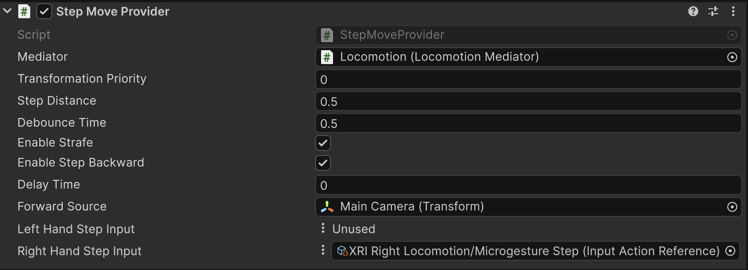
| Property | Description |
|---|---|
| Mediator | The behavior that this provider communicates with for access to the mediator's XR Body Transformer. If one is not provided, this provider will attempt to locate one during its Awake or OnEnable call. |
| Transformation Priority | The queue order of this provider's transformations of the XR Origin. The lower the value, the earlier the transformations are applied. |
| Step Distance | The distance, in meters, Unity moves the rig with each step. |
| Debounce Time | The amount of time that Unity waits before starting another step. |
| Enable Strafe | Controls whether to enable left and right steps. |
| Enable Step Backward | Controls whether to enable backward steps. |
| Delay Time | The time (in seconds) to delay the first step after receiving initial input for the step. Subsequent steps while holding down input are delayed by the Debounce Time, not the delay time. This delay can be used, for example, as time to set a tunneling vignette effect as a VR comfort option. |
| Forward Source | The source Transform that defines the forward direction. If not set, Unity uses the camera of the XR Origin. |
| Left Hand Step Input | Reads input data from the left hand. Input Action must be a Value action type (Vector 2). |
| Right Hand Step Input | Reads input data from the right hand. Input Action must be a Value action type (Vector 2). |