XR Socket Interactor
Interactor that automatically selects any interactable that it hovers.
You can use this interactor to receive interactables that the user moves into its hover range. For example, as a keyhole in which the user can insert a key or as a pedestal on which the user can place objects.
By default, a socket will select any interactable. You can use Interaction Layer Masks and Interactor Filters to limit interaction to specific interactables.
Supporting components
Refer to the Unity Manual for an introduction to collision for trigger colliders and how to configure trigger collisions.
Limitations with Physics settings
Unity 6.0 LTS and newer supports setting Physics settings to disable Generate On Trigger Stay Events in the Physics Project Settings. Disabling that option may improve performance since Unity will not generate OnTriggerStay events and is the recommended setting. However, doing so will introduce some minor limitations with this component. Unity does not trigger an OnTriggerExit event when a collider is disabled or its GameObject is deactivated. When enabled in Physics Project Settings, this component uses OnTriggerStay to detect when this occurs and properly update the list of colliders the interactor is touching each physics frame. But if this method is disabled in the Physics settings, the interactor can only rely on the OnTriggerEnter and OnTriggerExit events along with polling the enabled state of colliders.
If any of the trigger colliders on this interactor becomes disabled after touching another collider, such as by disabling it or deactivating the GameObject, the internal state maintaining the list of touching colliders will be fully cleared by this component. This is done to prevent interactables from being stuck as a valid target even when they are no longer touching the interactor's triggers. This means that if the interactor has multiple trigger colliders, disabling one of them will clear the valid targets even if the interactable is still touching an enabled trigger collider. Depending on which remaining enabled colliders are touching, the user would need to remove from the bounds of the trigger colliders and enter again for the OnTriggerEnter to fire to make it a valid target for hover and select. If the interactor only has a single trigger collider, you can avoid that limitation when Generate On Trigger Stay Events is disabled.
Note
The list of trigger colliders is captured during OnEnable of the interactor. If you add colliders to the interactor during runtime after that method, you will need to toggle the enabled state of the component to retrigger OnEnable for the list to be updated to support that behavior.
This component will similarly check if any of the touching interactable colliders have been disabled and treat it like an exit event with that collider. Unlike disabling the interactor's trigger colliders, this will only remove that collider rather than fully clearing the valid targets. Both of these checks of the enabled state of colliders are done during the yield WaitForFixedUpdate execution phase. Refer to Event function execution order for more information.
Base properties
Use the XR Socket Interactor properties
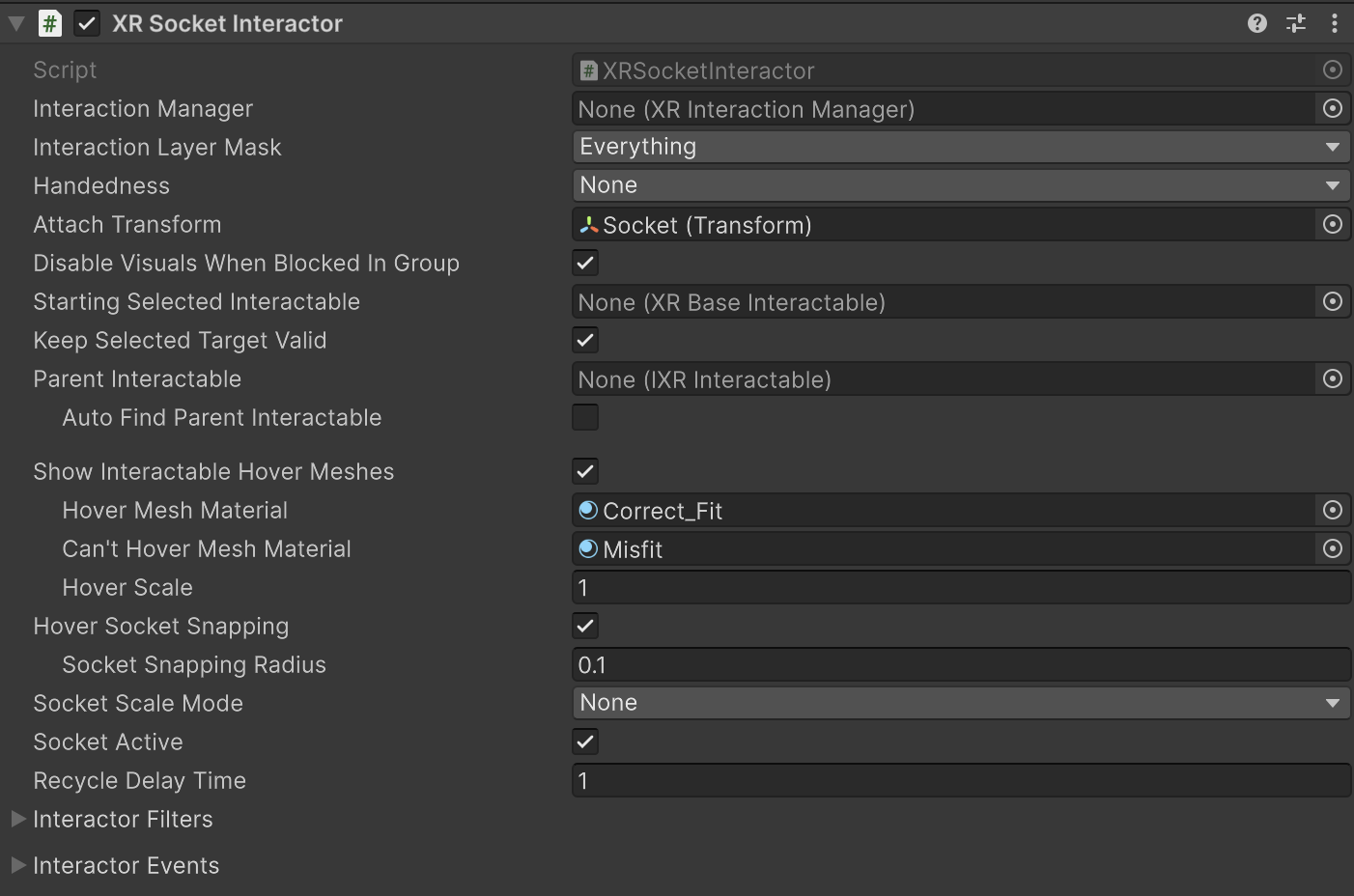
| Property | Description |
|---|---|
| Interaction Manager | The XRInteractionManager that this Interactor will communicate with (will find one if None). |
| Interaction Layer Mask | Allows interaction with interactables whose Interaction Layer Mask overlaps with any Layer in this Interaction Layer Mask. |
| Handedness | Set to None (unless mounted on a hand or controller). |
| Attach Transform | The Transform that is used as the attach point for interactables.Automatically instantiated and set in Awake if None.If you assign a new transform to this property, the previously assigned object is not automatically destroyed. |
| Disable Visuals When Blocked In Group | Whether to disable visuals when this interactor is part of an Interaction Group and is incapable of interacting due to active interaction by another Interactor in the Group. |
| Starting Selected Interactable | The interactable that this interactor automatically selects at startup (optional, can be None). |
| Keep Selected Target Valid | Whether to keep selecting an interactable after initially selecting it even when it is no longer a valid target. Enable to make the XRInteractionManager retain the selection even if the interactable is not contained within the list of valid targets. Disable to make the Interaction Manager clear the selection if it isn't within the list of valid targets. |
| Parent Interactable | An optional reference to a parent interactable dependency for determining processing order of interactables. Refer to Processing interactables for more information. |
| Auto Find Parent Interactable | Automatically find a parent interactable up the GameObject hierarchy when registered with the interaction manager. Disable to manually set the object reference for improved startup performance. |
| Show Interactable Hover Meshes | Whether this socket should show a mesh at socket's attach point for interactables in the hover state. |
| Hover Mesh Material | Material used for rendering interactable meshes on hover (a default material will be created if none is supplied). |
| Can't Hover Mesh Material | Material used for rendering interactable meshes on hover when there is already a selected object in the socket (a default material will be created if none is supplied). |
| Hover Scale | Scale at which to render the hover mesh displayed at the socket's attach point. |
| Hover Socket Snapping | Determines if the interactable should snap to the socket's attach transform when hovering. Note this will cause z-fighting with the hover mesh visuals, not recommended to use both options at the same time. If enabled, hover recycle delay functionality is disabled. |
| Socket Snapping Radius | When socket snapping is enabled, this is the distance at which the interactable will snap into or out of the socket's attach transform. The distance is affected by the scale of the interactable. |
| Socket Scale Mode | Scale mode used to calculate the scale factor applied to the interactable when selected. |
| Fixed Scale | Scale factor applied to the interactable when scale mode is set to Fixed. |
| Target Bounds Size | Bounds size used to calculate the scale factor applied to the interactable when scale mode is set to Stretched To Fit Size. |
| Socket Active | Whether socket interaction is enabled. |
| Recycle Delay Time | Sets the amount of time the socket will refuse hovers after an object is removed. This property does nothing if Hover Socket Snapping is enabled. |
| Interactor Filters | Identifies any filters this interactor uses to winnow detected interactables. You can create filter classes to provide custom logic to limit which interactables an interactor can interact with. Filtering occurs after the interactor has performed a raycast to detect eligible interactables. |
| Interactor Events | The events dispatched by this interactor. You can add event handlers in other components in the scene or prefab and they are invoked when the event occurs. |
Tip
You can assign set various scale factors using the Attach Transform, Hover Scale, and Socket Scale Mode properties. These scale properties can interact with each other and behave differently depending on whether the target interactable is hovering or selected.
Interactor Filters
Configure the starting set of filters that an interactor uses to determine which interactables are eligible for interaction. All of these filter properties are optional. If you do not assign them, the interactor uses default behavior.
Refer to Interaction filters for more information about implementing filters.
| Property | Description |
|---|---|
| Starting Target Filter | Filters the list of interactables that are eligible for interaction. |
| Starting Hover Filters list | Validates which potential hover targets are eligible for hover interaction. |
| Starting Select Filters list | Validates which potential select targets are eligible for select interaction. |
Interactor Events
You can assign listener functions for interaction events in the Inspector window and in a C# class. These events apply to interactors - objects that can interact with interactables.
The UI Hover Entered and UI Hover Exited events are not available on all interactor components. Only those interactors that implement IUIHoverInteractor and enable UI Interaction with the XR UI Input Module, such as XR Poke Interactor, will have these events.
For detailed code examples showing how to subscribe to events and work with the event arguments, refer to Handle interaction events.
| Property | Description |
|---|---|
| Hover Entered | The event that is called when this interactor begins hovering over an interactable. |
| Hover Exited | The event that is called when this interactor ends hovering over an interactable. |
| Select Entered | The event that is called when this interactor begins selecting an interactable. |
| Select Exited | The event that is called when this interactor ends selecting an interactable. |
| UI Hover Entered Event | Event triggered when a UI element is hovered over by this interactor. |
| UI Hover Exited Event | Event triggered when a UI element is no longer hovered over by this interactor. |
Note
Additional events might be available to listeners you assign in C# code. Refer to the XRBaseInteractor subclass documentation for specific information.