Simple Audio Feedback
Customize audio feedback settings to play sound effects during interaction events.
Use this component to provide audio feedback when a user selects or hovers over an object.
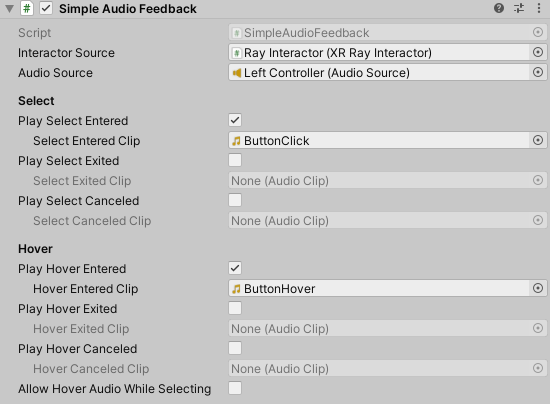
The Simple Audio Feedback component showing all properties.
Simple Audio Feedback properties
The Simple Audio Feedback component contains the following properties:
| Property | Description |
|---|---|
| Interactor Source | Sets the interactor component to listen to for interaction events. |
| Audio Source | Sets the Audio Source component used to play audio clips. |
Select
The Select section contains the following properties:
| Property | Description |
|---|---|
| Play Select Entered | Plays an audio clip when the interactor starts selecting an interactable. |
| Select Entered Clip | Sets the audio clip to play when the interactor starts selecting an interactable. This property is available only when Play Select Entered is enabled. |
| Play Select Exited | Plays an audio clip when the interactor stops selecting an interactable. |
| Select Exited Clip | Sets the audio clip to play when the interactor stops selecting an interactable. This property is available only when Play Select Exited is enabled. |
| Play Select Canceled | Plays an audio clip when the interactor stops selecting an interactable because the interaction is canceled. |
| Select Canceled Clip | Sets the audio clip to play when the interaction is canceled. This property is available only when Play Select Canceled is enabled. |
Hover
The Hover section contains the following properties:
| Property | Description |
|---|---|
| Play Hover Entered | Plays an audio clip when the interactor starts hovering over an interactable. |
| Hover Entered Clip | Sets the audio clip to play when the interactor starts hovering over an interactable. This property is available only when Play Hover Entered is enabled. |
| Play Hover Exited | Plays an audio clip when the interactor stops hovering over an interactable. |
| Hover Exited Clip | Sets the audio clip to play when the interactor stops hovering over an interactable. This property is available only when Play Hover Exited is enabled. |
| Play Hover Canceled | Plays an audio clip when the interactor stops hovering over an interactable because the interaction is canceled. |
| Hover Canceled Clip | Sets the audio clip to play when the interaction is canceled. This property is available only when Play Hover Canceled is enabled. |
| Allow Hover Audio While Selecting | Allows hover audio to play while the interactor is already selecting an interactable. |