What's new in version 7.0
XR Hands 7.0 aligns the package version with Unity 7 and changes long-obsolete APIs from compiler warnings to compiler errors.
Discover new features and performance improvements in the latest update to XR Hands. For a full list of changes and updates in this version, refer to the XR Hands changelog.
Added
Microgestures
XR Hands now reports thumb microgestures: a thumb swipe to the left, right, forward, or backward, and a thumb tap. Query microgestures through XRCommonHandGestures with IsMicrogestureActive, WasMicrogesturePerformedThisFrame, WasMicrogestureCompletedThisFrame, and the microgestureUpdated event, or bind to the new <XRHandDevice> controls microgestureSwipe and microgestureTapThumb. XRHandSubsystemDescriptor.supportsMicrogestures indicates whether the provider supports microgestures. On OpenXR, microgestures require specific OpenXR features.
For more information, refer to Microgestures.
Changed
Package version alignment
The package version changed from 1.10 to 7.0 to align the package major version with Unity 7. The minimum supported Unity Editor version increased to 7000.0 from 6000.0.
Samples require URP
All samples now support only the Universal Render Pipeline (URP), and no longer include the MaterialPipelineHandler script that converted materials between render pipelines. To use the samples, install and configure URP in your project. For more information, refer to Install and configure URP.
Aim pose in Legacy mode
The <XRHandDevice> input device now updates the aim pose (aimPosition, aimRotation, aimIsTracked, and aimTrackingState) in Legacy mode, not just Common Gestures mode. If the Hand Interaction Profile isn't enabled and the Meta Hand Tracking Aim OpenXR feature is, the OpenXRHandProvider populates this aim pose from the Meta Hand Tracking Aim pose. For more information, refer to XR Hand Device: Configuration.
Obsolete APIs now cause compiler errors
Using the following obsolete APIs now causes a compiler error instead of a warning, and the package no longer implements them. If code still calls an obsolete method or property setter, for example from a precompiled assembly, the call throws a NotSupportedException. Update your code to use the replacement APIs:
| Obsolete API | Replacement |
|---|---|
HandTracking.featureId |
HandTracking.featureId2 |
MetaHandTrackingAim.AimFlags |
MetaAimFlags |
MetaAimHand.UpdateHand overload without an isTracked parameter |
The MetaAimHand.UpdateHand overload with a first isTracked parameter |
XRHandProviderUtility.CreateJoint overload without a Handedness parameter |
The XRHandProviderUtility.CreateJoint overload with a first Handedness parameter |
XRHandSkeletonDriver.m_HasRootTransform |
XRHandSkeletonDriver.hasRootTransform |
XRHandSubsystem.handsUpdated |
XRHandSubsystem.updatedHands |
XRFingerShapeCondition.Target.tolerance |
upperTolerance and lowerTolerance |
Note
Version 7.0 no longer automatically upgrades hand shape assets created with version 1.3 or earlier, which use a single tolerance value. To upgrade these assets, open your project with version 1.4 to 1.10 of the package and select each affected hand shape asset in the Project window before you upgrade to 7.0. If you already upgraded, these hand shapes have upper and lower tolerances of 0 and are unlikely to be detected. Set the tolerances again for each affected finger shape.
Removed
The obsolete MetaHandTrackingAim.leftHand, MetaHandTrackingAim.rightHand, and MetaHandTrackingAim.MetaAimHand APIs have been removed. Use MetaAimHand.left, MetaAimHand.right, and MetaAimHand instead.
What's new in version 1.10
The main updates in this release include:
Added
Meta Hand Tracking Frequency Hint OpenXR feature
The Meta Hand Tracking Frequency Hint OpenXR feature allows applications to provide a frequency hint to the runtime to indicate the desired hand tracking update frequency. You can enable this feature to request higher-frequency hand tracking updates and improve responsiveness in your project.
For more information, refer to Meta Hand Tracking Frequency Hint OpenXR feature.
Meta Hand Tracking Wide Motion Mode OpenXR feature
The Meta Hand Tracking Wide Motion Mode OpenXR feature enables inference-based hand tracking when hands move outside the camera tracking volume. When enabled, the runtime uses prior tracking data, body movement, and additional sensors to estimate hand poses, and automatically configures the Hand Tracking Data Source feature to request both optical and inference-based tracking sources.
For more information, refer to Meta Hand Tracking Wide Motion Mode OpenXR feature.
Meta Hand Tracking Unextrapolated Poses OpenXR feature
The Meta Hand Tracking Unextrapolated Poses OpenXR feature surfaces hand joint poses that the runtime has not extrapolated, along with the time at which they were captured. You can enable this feature when your project needs the poses as the runtime captured them, together with the time of capture, rather than the runtime's estimate of where the hands are now. The default hand data is unchanged, so hand tracking already in your project continues to behave exactly as before.
For more information, refer to Meta Hand Tracking Unextrapolated Poses OpenXR feature.
What's new in version 1.9
The main updates in this release include:
Added
Hand tracking extensibility
The new hand tracking extensibility APIs let you augment Unity's OpenXR hand tracking with additional OpenXR extensions. By deriving from the new OpenXRHandTrackingFeature, device vendors and SDK authors can attach custom extension structures to the xrCreateHandTrackerEXT and xrLocateHandJointsEXT calls and read runtime-supplied data each frame. A new XrStructureChain type manages these extension structures in unmanaged memory.
This release also adds support for two OpenXR features built on this mechanism:
- Hand Tracking Data Source: Choose a preferred hand tracking data source per hand and query the active source at runtime.
- Hand Joints Motion Range: Constrain hand joint poses to natural movement or controller-conforming movement.
GPU-skinned hand rendering
XRHandMeshData now includes bone weights, bind poses, and joint radii, so you can render hands with a SkinnedMeshRenderer instead of rebuilding mesh vertices every frame.
Supporting OpenXR features, such as Meta Quest: Hand Mesh Data, supply this data through XRHandSubsystem.TryGetMeshData. Refer to GPU-Skinned Hand Rendering.
Changed
The minimum supported editor version increased to 6000.0 from 2022.3.
What's new in version 1.8
The main updates in this release include:
Added
Additional XRHandDevice controls
New controls have been added to XRHandDevice for parity with the OpenXR Hand Interaction Profile:
| Control | Type | Description |
|---|---|---|
graspFirm |
ButtonControl |
Indicates whether the user is making a fist. |
pinchTouched |
ButtonControl |
Indicates whether the user is currently pinching. |
aimActivated |
ButtonControl |
Indicates whether the aim action is fully activated. |
OpenXR Hand Subsystem Manager component
The new OpenXRHandSubsystemManager component provides control over the lifecycle of the XRHandSubsystem and its updater created by the OpenXR Hand Tracking feature. Toggle the component's enabled state to start and stop hand tracking.
A new Auto Start Subsystem setting has also been added to the Hand Tracking OpenXR feature settings in Project Settings. Disabling this setting, combined with the OpenXRHandSubsystemManager component, supports deferred initialization workflows such as permission gating.
The HandVisualizer sample also includes a new Hand Debug Visualizer prefab with this component already configured for easier scene setup.
What's new in version 1.7
The main updates in this release include:
Added
XR Hand Capture feature
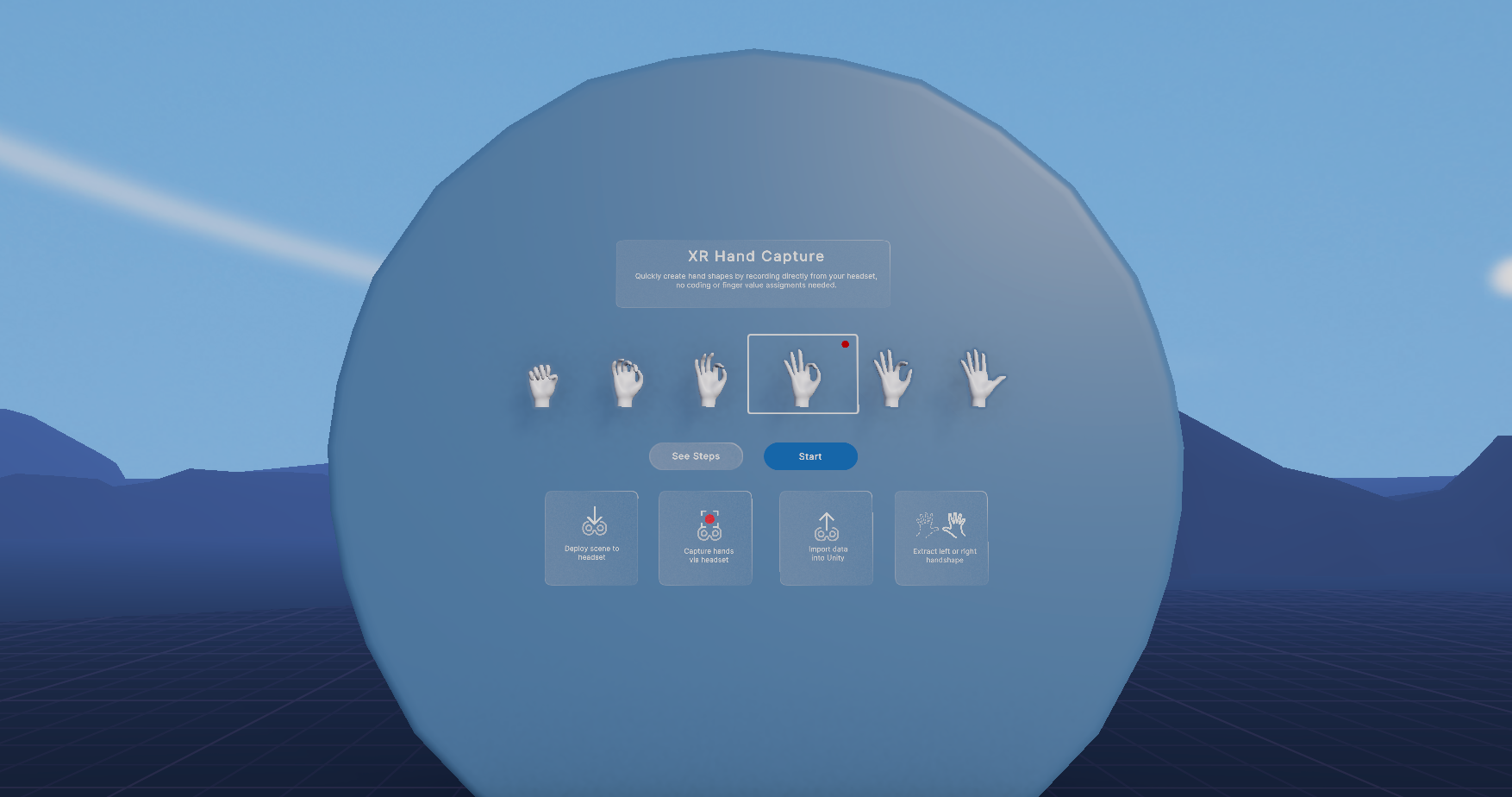
The new XR Hand Capture feature streamlines the creation of custom hand gestures for XR applications.
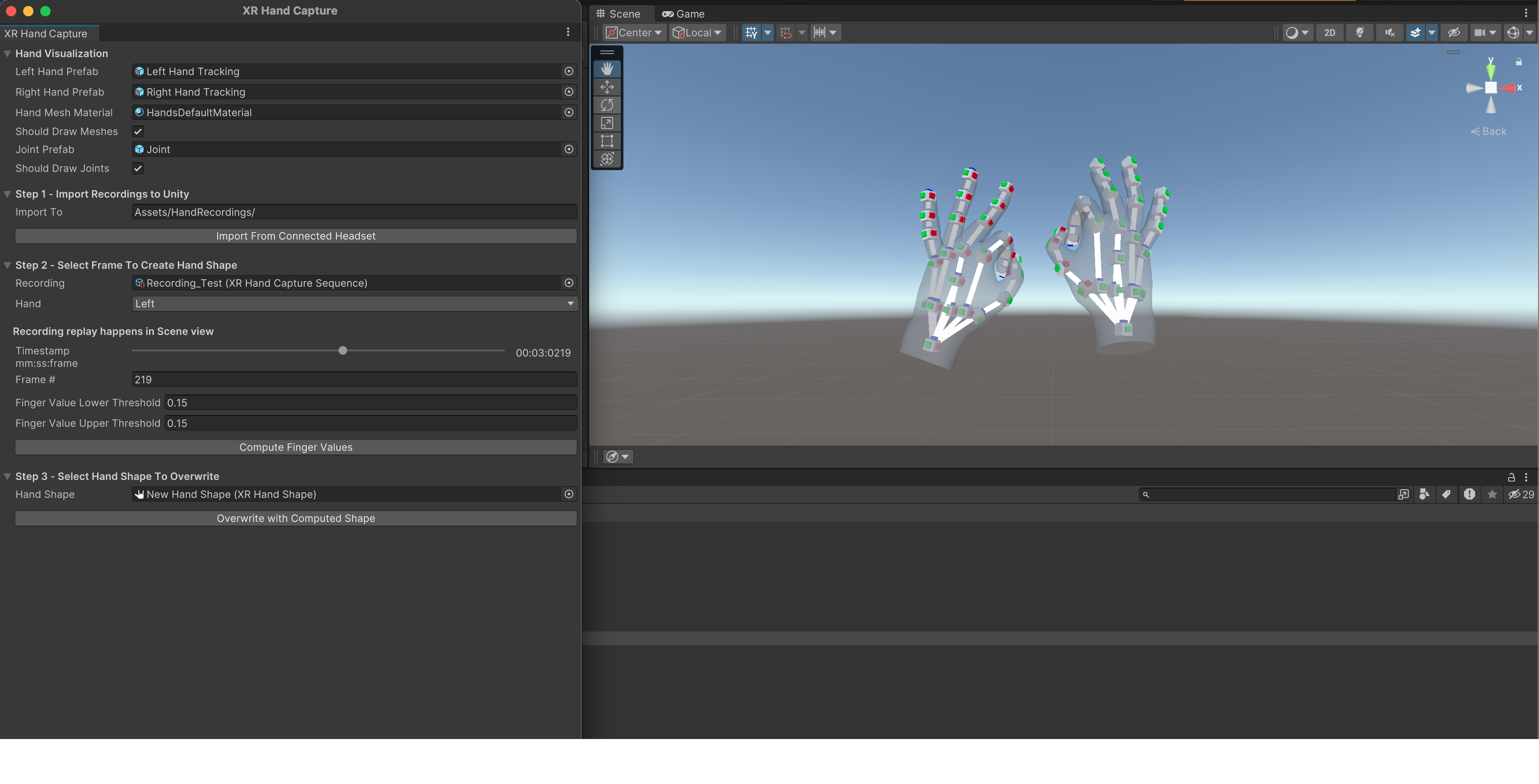
You can now record hand data directly on supported XR devices using an intuitive in-headset UI, and import these recordings into the Unity Editor for further processing. With built-in visualization and editing tools, you can easily convert captured data into reusable XRHandShape assets and fine-tune gestures for robust recognition.
What's new in version 1.6
Summary of changes in XR Hands package version 1.6. The main updates in this release include:
Added
New XRHandShape Inspector
A new inspector has been added to make creating custom hand shape and finger shapes easier to navigate and fine-tune specific values for target and threshold levels for finger shape detection.
Hand Shape Completeness Calculator
A new Hand Shape Completeness Calculator component has added to the Gestures sample and the HandGestures sample scene has been updated to support this feature. This tool allows you to evaluate, in real-time, how closely your current hand shape matches a predefined target hand shape. Additionally, the completeness calculation method can be customized to suit your specific requirements.
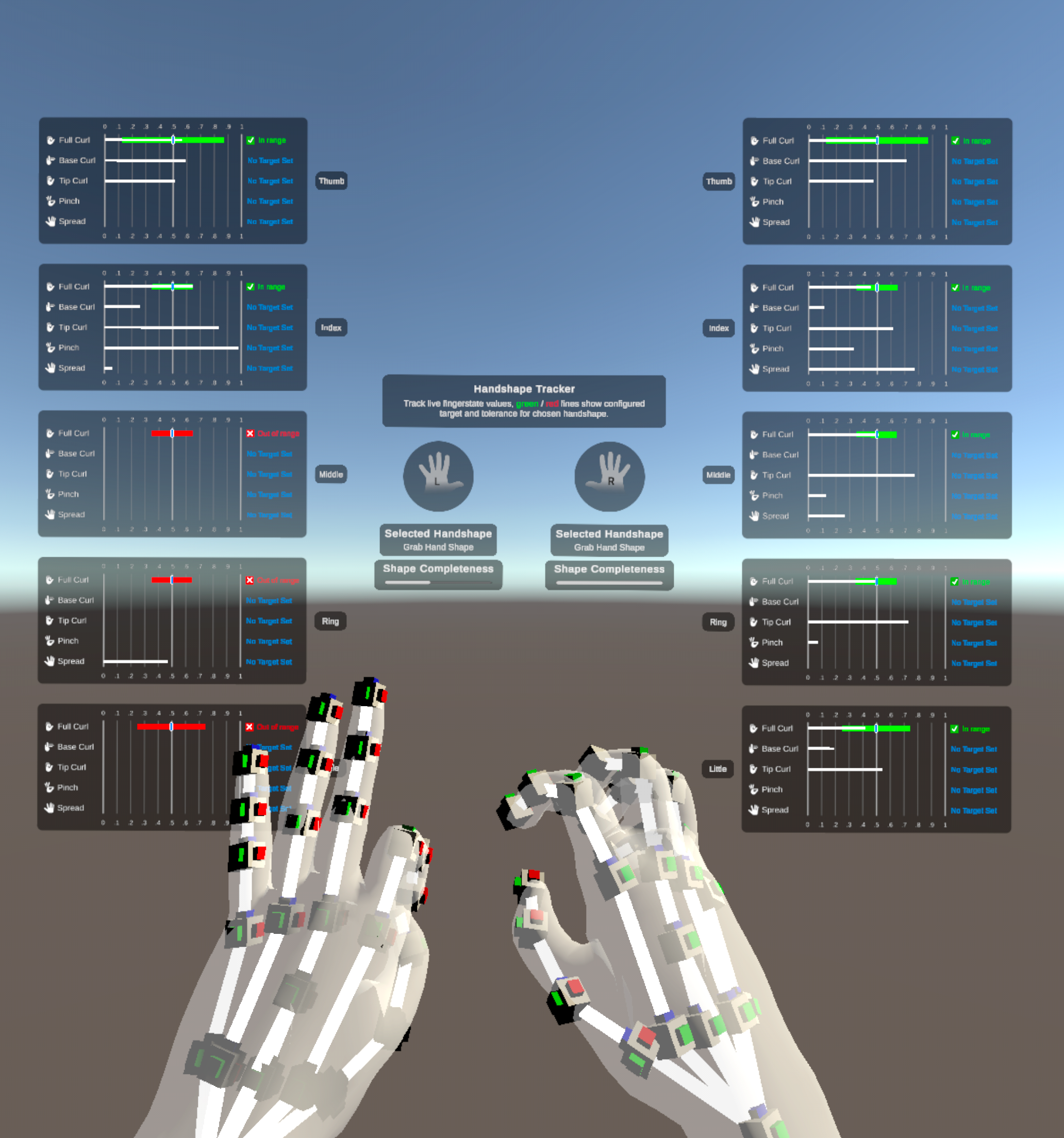
The progress bar shows the left hand performing an incomplete grab shape and the right hand performing a full grab shape.
What's new in version 1.5
Summary of changes in XR Hands package version 1.5. The main updates in this release include:
Added
OpenXR common hand gestures
Support for common hand gestures has been added with initial support for gestures piped through the OpenXR Hand Interaction Profile extension. This includes scripting APIs to expose aim, grasp, grip, pinch, and poke poses and values where appropriate for more information, please refer to the Scripting API.
High Fidelity Tracking Flag
The XR Hands package now enables the detection of high or low fidelity hand tracking data via XRHandJointTrackingState.HighFidelityPose. For OpenXR based devices, this is set if and only if a joint has its position and orientation marked as tracked by the underlying runtime. For other platforms, consult the supporting package's documentation.
Fixed
- Fixed performance regression in hand gesture debug UI.
What's new in version 1.4
Summary of changes in XR Hands package version 1.4. The main updates in this release include:
Added
Hand shape and static gesture detection
The XR Hands package now enables detection of static hand gestures such as thumbs up, thumbs down, or pointing. The static hand gestures are the combination of a specific hand shape with an optional orientation applied. There are some hand gestures included in the Gestures sample, along with other tools to get you started.
For additional information, refer to Custom gestures.
Upper and lower tolerance threshold range for finger shapes
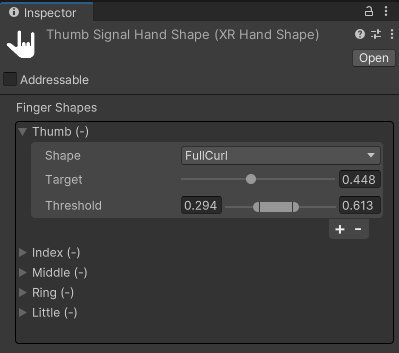
The ability to specify lower and upper tolerance threshold limits for individual finger shapes when defining a hand shape is now available. Each finger shape behaves differently on specific fingers or hands based on various factors. Adding specific tolerance ranges increases the chances of detecting a gesture.
Intermediate grab pose
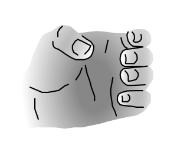
Grab is one of the more nuanced interactions in XR. Providing an intermediate grab pose with upper and lower tolerances for the finger shapes speeds up the process for implementing grab interactions.
Updates
Debugging menu with prebuilt hand poses
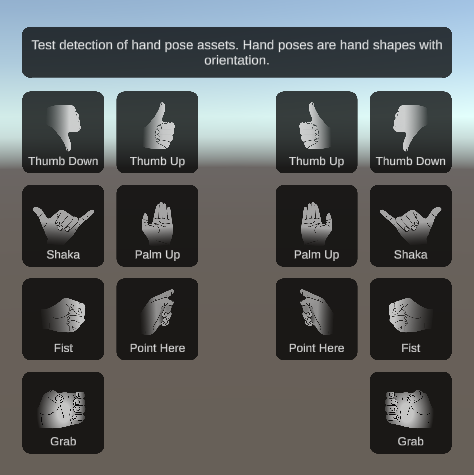
This menu displays text-based tiles for hand poses that are now visually enhanced with drawings to illustrate the meaning of each prebuilt pose. You can still add a tile to detect your own hand pose, which will appear as a text-based tile..
Debugging menu for individually assigned hand shapes
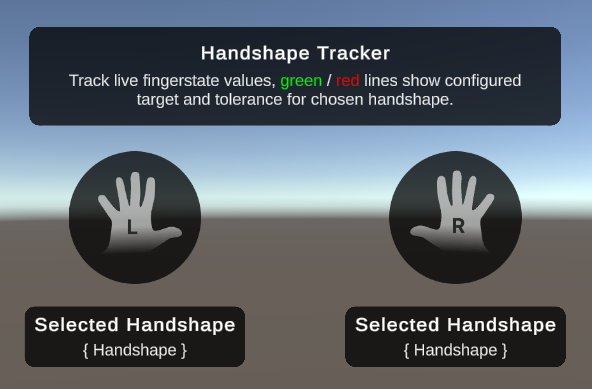
This menu displays live finger state values, and allows for debugging selected hand shapes. The Finger State UI elements have been rebuilt, and enhanced with support for displaying upper and lower tolerance ranges, along with additional UI changes that help to display the state of the currently detected gesture input.
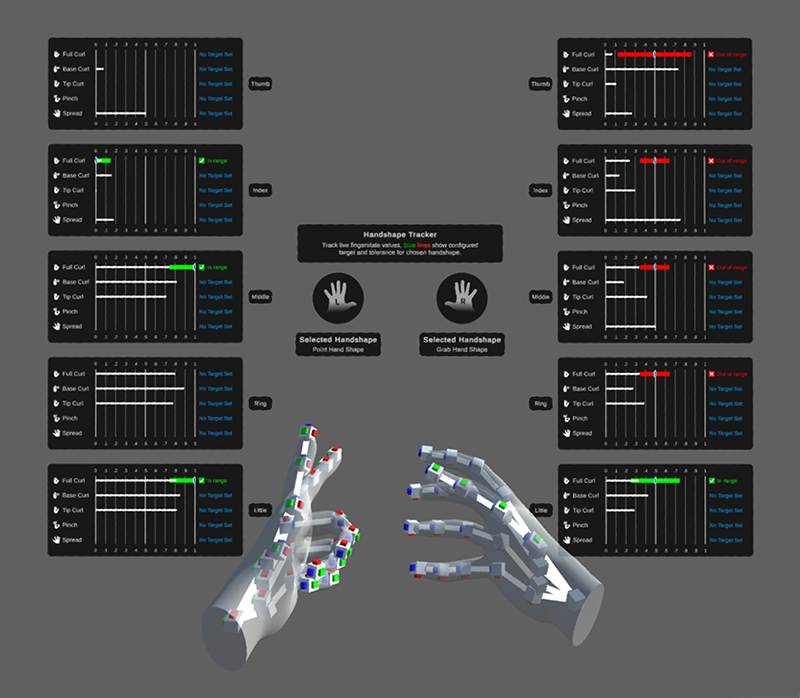
The gesture debugger scene visualizing a gesture
Advanced Debugging menu for prebuilt hand poses
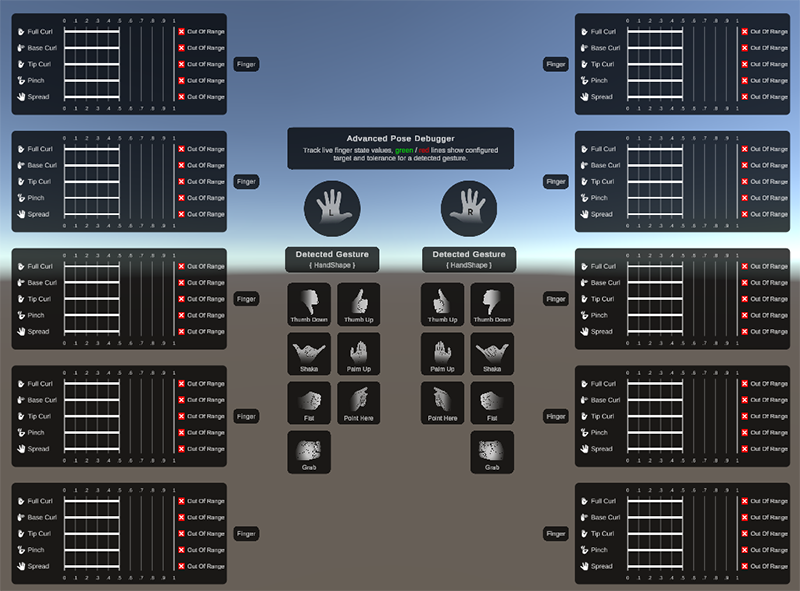
This menu displays live finger state values, and also allows for debugging assigned between multiple hand poses with additional gesture and fingershape information being displayed.
What's new in version 1.3
Summary of changes in XR Hands package version 1.3.
The main updates in this release include:
Added
- Added a root pose offset to the
XRHandSkeletonDriverthat allows an additional offset to the root pose (typically the wrist). This is useful for situations where you want the visual hand representation to stop while interacting with objects in a scene. - Added missing sample script API documentation to make it easier to understand and build off of.
Fixed
- Fixed documentation links for OpenXR features to point at latest documentation version.
What's new in version 1.2
Summary of changes in XR Hands package version 1.2.
The main updates in this release include:
Added
- Added
IXRHandProcessorinterface that intercepts and allows post-processing joint data before being used by other scripts. More information can be found on the XR Hands Joint Processing manual page. - Added two samples to the Hand Visualizer sample for how to use the new Joint Processing feature to change the visual output of hand tracking.
XRHandandXRHandJointboth now implementIEquatable, and haveEquals,GetHashCode, and the==and!=operators overloaded.- Added
XRHandTrackingEventscomponent that subscribes to hand tracking events for a specific hand and surfaces Unity Events when the hand updates or tracking state changes. - Added
XRHandMeshControllercomponent that subscribes to events from aXRHandTrackingEventsand can optionally show or hide a mesh. - Added
XRHandSkeletonDrivercomponent that subscribes to events from aXRHandTrackingEventsand updates a hierarchy of Transforms for eachXRHandJoint.
Changed
- Minimum supported Unity Editor version has changed to 2021.3.
Fixed
- Fixed Hand Visualizer component so it will use another running
XRHandSubsystemif the first is stopped. - Fixed exception in Hand Visualizer component when a joint is invalid.
- Fixed rendering of lines that connect joints in
HandVisualizersample when used with the device simulator. Also removed the Origin property from the component since it was no longer used.
What was new in version 1.0
Summary of changes in XR Hands package version 1.0.
The main updates in this release include:
Added
Added subsystem for cross-platform hand-tracking and accompanying types.
Types you might care about as a user:
XRHandSubsystemDescriptor, which you can retrieve aListof withSubsystemManager.GetSubsystemDescriptors.XRHandSubsystem, which can be created with a call toCreateon the above descriptor type.XRHand, which you can retrieve fromXRHandSubsystemwith itsleftHandandrightHandproperties. These contain joints androotPosedata, as well as itsHandedness.XRHandJoint, which you can retrieve from eachXRHandusingGetJointto query for joint tracking state, pose, radius, and velocity data on a per-joint basis.XRHandJointIDUtility, which contains extension methods for certainenums listed below and also housesFromIndex, which you can use when looping over an array to get the correspondingXRHandJointID(useful when callingXRHand.GetJoint).
As well as these enums:
XRHandJointTrackingState, a flags-enumused to denote which fields are valid and can be retrieved via theirTryGet...methods onXRHandJoint.XRHandJointID, used to identify each joint, and required when accessing joint data usingXRHand.GetJoint. If looping over an array of joint data, useXRHandJointIDUtility.FromIndexto convert your index toXRHandJointID, which is required forXRHand.GetJoint.Handedness, used to identify which hand is referred to by anXRHandusing itshandednessproperty.XRHandFingerID, not used anywhere else in the API surfaced in this package besides its extension methods inXRHandJointIDUtility:GetFrontJointIDandGetBackJointID, which together provider an inclusive range forXRHandJointIDs spanned by the finger represented byXRHandFingerID.
The OpenXR package must be installed and in use for these to work:
- Added OpenXR support through
HandTrackingandOpenXRHandProvidertypes. - Added support for Meta Hand Tracking Aim extension in OpenXR through
MetaHandTrackingAim.
Additional types you may need to interact with if writing a provider (not a common use case):
XRHandSubsystemProvider, which the subsystem asks for data whenever itsTryUpdateHandsis called (built-in Unity setup calls this each frame) and is also queried when the subsystem and provider are created for which common joints are in the provider's layout usingGetHandLayout.XRHandProviderUtility, which providers should call into usingCreateJointduring theTryUpdateHandsper-frame call to fill out the left- and right-hand joint arrays. This same type also has a nestedSubsystemUpdatertype to be used for automatically updating the subsystem each frame. Users can respond to updates by subscribing to the subsystem'supdatedHandscallback.
Also added a visualizer sample, which demonstrates drawing using both meshes and per-joint prefabs. You can add this sample to your project through the Samples tab of this package's view in the Package Manager window. This sample has a mesh and script that assume OpenXR layout, so it is recommended you either use that plug-in or another one that conforms to the OpenXR hand joint layout.
For a full list of changes and updates in this package, see the XR Hands package changelog.