Hand Joints Motion Range OpenXR feature
The Hand Joints Motion Range feature lets you constrain hand joint poses to either the full natural range of hand motion or to motion that conforms to a held controller. This feature enables the XR_EXT_hand_joints_motion_range OpenXR extension.
You can set the following options per hand:
- Natural Movement: joint poses reflect the full, unobstructed range of hand motion. This is the default.
- Controller-locked: joint poses conform to a held controller, reflecting how the hand wraps around the device.
You can change the motion range at runtime without recreating the hand tracker, as outlined in Update the motion range at runtime.
Note
Controller-locked mode is only effective when the Hand Tracking Data Source feature includes Controller-driven as a preferred source.
Prerequisites
To use the Hand Joints Motion Range feature, your project must meet the following requirements:
- Install the OpenXR package
1.18.0or newer. - Enable the Hand Tracking Subsystem feature. A validation rule alerts you if it isn't enabled.
Note
The Hand Joints Motion Range feature requires the target device's runtime to support the XR_EXT_hand_joints_motion_range extension. If the runtime doesn't support it, the feature has no effect. Hand tracking continues with the runtime's default joint motion range, and TryGetConfiguration / TryUpdateConfiguration return false.
Enable Hand Joints Motion Range
To enable the Hand Joints Motion Range feature:
- Go to Project Settings > XR Plug-in Management > OpenXR.
- Under OpenXR Feature Groups, select the All Features feature group.
- Enable the Hand Joints Motion Range OpenXR feature.
Configure feature settings
To access the Hand Joints Motion Range settings, click the gear icon next to Hand Joints Motion Range in Project Settings > XR Plug-in Management > OpenXR.
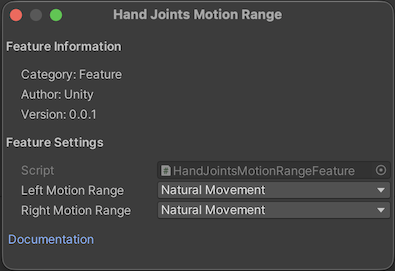
Feature settings for Hand Joints Motion Range
You can choose a motion range per hand:
| Property | Description |
|---|---|
| Left Motion Range | The motion range constraint for the left hand. Default: Natural Movement. |
| Right Motion Range | The motion range constraint for the right hand. Default: Natural Movement. |
You can choose one of the following motion ranges:
| Option | Description |
|---|---|
| Natural Movement | Joint poses reflect the full natural range of hand motion. Maps to XR_HAND_JOINTS_MOTION_RANGE_UNOBSTRUCTED_EXT. |
| Controller-locked | Joint poses conform to the shape of a held controller. Maps to XR_HAND_JOINTS_MOTION_RANGE_CONFORMING_TO_CONTROLLER_EXT. |
Update the motion range at runtime
You can read and update the requested hand joints motion range at runtime through the XRHandSubsystem configuration handler API.
Query the requested configuration
Use XRHandSubsystem.TryGetConfiguration<HandJointsMotionRangeConfig> to read the requested motion range for each hand:
void GetMotionRange()
{
    if (m_Subsystem.TryGetConfiguration<HandJointsMotionRangeConfig>(out HandJointsMotionRangeConfig config))
    {
        Debug.Log($"Left: {config.leftMotionRange}, Right: {config.rightMotionRange}");
    }
}
Update the configuration
Use XRHandSubsystem.TryUpdateConfiguration<HandJointsMotionRangeConfig> to change the motion range. The update takes effect on the next xrLocateHandJointsEXT call:
void UpdateMotionRange()
{
    HandJointsMotionRangeConfig newConfig = new HandJointsMotionRangeConfig
    {
        leftMotionRange = HandJointsMotionRange.ConformingToController,
        rightMotionRange = HandJointsMotionRange.ConformingToController,
    };

    if (m_Subsystem.TryUpdateConfiguration(newConfig))
    {
        Debug.Log("Motion range updated successfully.");
    }
}
The method returns false if either value isn't a valid HandJointsMotionRange member or if the internal structure chain isn't available.