Install AR Foundation
AR Foundation is an official Unity package available via the Package Manager.
Editor compatibility
AR Foundation 7.0 is compatible with Unity 7 (7000.0) or newer.
Older Editor versions
If your project requires an older version of the Editor, you can use one of the supported versions of AR Foundation in the following table.
| Editor version | AR Foundation version |
|---|---|
| 6000.0 LTS | 6.0 |
| 6000.3 LTS | 6.3 |
| 6000.7 LTS | 6.7 |
Required packages
The AR Foundation package contains interfaces for AR features, but doesn't implement any AR features itself. To use AR Foundation on a target platform, you also need a separate provider plug-in package for that platform. A provider plug-in is a separate package containing AR Foundation feature implementations for a given platform.
Unity officially supports the provider plug-ins in the following table with this version of AR Foundation.
| Platform | Plug-in | Version |
|---|---|---|
| Android | Google ARCore XR Plug-in | 7.0 |
| iOS | Apple ARKit XR Plug-in | 7.0 |
| visionOS | Apple visionOS XR Plug-in | 3.1 |
| Meta Quest | Unity OpenXR: Meta | 7.0 |
| Android XR | Unity OpenXR: Android XR | 7.0 |
| Meta Quest or Android XR | Unity OpenXR: Spatial Entities | 7.0 |
To use AR Foundation on a device, you must install at least one provider plug-in, either from the Package Manager or by going to Project Settings > XR Plug-in Management as shown below.
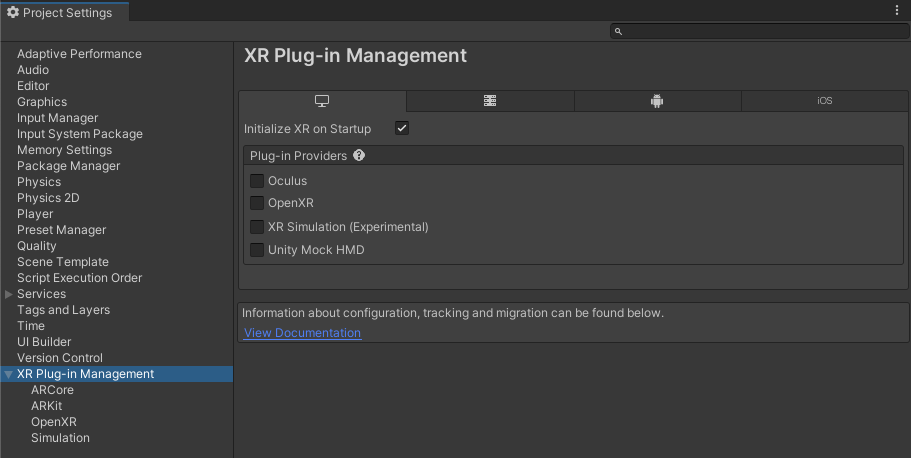
XR Plug-in Management
Note
Google also maintains a separate product, ARCore Extensions for AR Foundation, that you can use to access additional ARCore capabilities.
Provider project settings
Some provider plug-ins require that you set specific project settings for AR to function properly. Refer to each provider's documentation, listed in the following table, for specific instructions.
| Provider plug-in | Setup instructions |
|---|---|
| Google ARCore XR Plug-in | Project configuration (ARCore) |
| Apple ARKit XR Plug-in | Project configuration (ARKit) |
| Unity OpenXR: Meta | Get started (OpenXR Meta) |
| Unity OpenXR: Android XR | Get started (Android XR) |
| Unity OpenXR: Spatial Entities | Get started (Spatial Entities) |
Third-party plug-ins
It is possible to develop custom provider plug-ins for AR Foundation. If you are using a third-party provider plug-in, refer to third-party documentation for more specific instructions regarding installation and use.
Apple and ARKit are trademarks of Apple Inc., registered in the U.S. and other countries and regions.