Assign Players to Teams
This tutorial shows how to implement a team-based multiplayer system where players are automatically assigned to teams, colored by team, and protected from friendly fire.
Overview
| Component | Responsibility |
|---|---|
CorePlayerState |
Stores the player's team index (0, 1, etc.) |
GameManager |
Assigns players to teams when they connect or respawn |
VisualsAddon |
Colors player meshes based on their team |
ShooterHitProcessor |
Prevents damage between teammates |
WeaponHUD |
Displays team name and teammate list |
Part 1: Store the Team (CorePlayerState)
The first step is adding a networked variable to store each player's team. This uses the same pattern as the existing player name—owner writes, everyone reads.
In CorePlayerState.cs, add the team NetworkVariable and related methods:
private readonly NetworkVariable<byte> m_Team = new NetworkVariable<byte>(
    0,
    NetworkVariableReadPermission.Everyone,
    NetworkVariableWritePermission.Owner);

public byte Team => m_Team.Value;
public event Action<byte> OnTeamChanged;
In OnNetworkSpawn(), subscribe to team changes (after the existing subscriptions):
m_Team.OnValueChanged += HandleTeamChanged;
// Broadcast initial team to ensure all systems are synchronized
OnTeamChanged?.Invoke(m_Team.Value);
In OnNetworkDespawn(), unsubscribe:
public override void OnNetworkDespawn()
{
    m_Team.OnValueChanged -= HandleTeamChanged;
}
Add the SetTeam method and RPC for non-owners to request changes:
public void SetTeam(byte teamIndex)
{
    if (IsOwner)
    {
        m_Team.Value = teamIndex;
    }
    else
    {
        SetTeamRpc(teamIndex);
    }
}

[Rpc(SendTo.Owner)]
private void SetTeamRpc(byte teamIndex)
{
    m_Team.Value = teamIndex;
}

private void HandleTeamChanged(byte oldTeam, byte newTeam)
{
    OnTeamChanged?.Invoke(newTeam);
}
Part 2: Assign Teams (GameManager)
Next, add automatic team assignment when players connect. Players are distributed evenly across teams using their client ID.
In GameManager.cs, add a serialized field for the number of teams:
[SerializeField] private int numberOfTeams = 2;
In ClientConnected(), assign the team after setting the player name:
AssignTeam(playerState, NetworkManager.Singleton.LocalClientId);
Add the AssignTeam method:
private void AssignTeam(CorePlayerState playerState, ulong clientId)
{
    if (playerState == null || numberOfTeams <= 0) return;
    byte teamIndex = (byte)(clientId % (ulong)numberOfTeams);
    playerState.SetTeam(teamIndex);
}
Part 3: Team Visuals (VisualsAddon)
Now update the visual system to color players based on team assignment instead of client ID.
In VisualsAddon.cs, add a reference to the player state:
private CorePlayerState m_PlayerState;
In OnPlayerSpawn(), subscribe to team changes:
public void OnPlayerSpawn()
{
    m_PlayerState = m_PlayerManager.GetComponent<CorePlayerState>();
    if (m_PlayerState != null)
    {
        m_PlayerState.OnTeamChanged += HandleTeamChanged;
    }
    // Existing code
}
In OnPlayerDespawn(), unsubscribe:
public void OnPlayerDespawn()
{
    if (m_PlayerState != null)
    {
        m_PlayerState.OnTeamChanged -= HandleTeamChanged;
    }
}
Update ApplyMaterialSet() to use team index:
private void ApplyMaterialSet()
{
    // Get team index from CorePlayerState for consistent team colors
    int index = 0;
    if (m_PlayerState != null)
    {
        index = m_PlayerState.Team % materialSets.Count;
    }
    else
    {
        // Fallback to client ID if no player state (shouldn't happen)
        ulong clientId = m_PlayerManager.OwnerClientId;
        index = (int)(clientId % (ulong)materialSets.Count);
    }
    // Existing code
}
Add the team change handler:
private void HandleTeamChanged(byte newTeam)
{
    ApplyMaterialSet();
}
Part 4: Friendly Fire Prevention (ShooterHitProcessor)
Add a check to prevent teammates from damaging each other.
In ShooterHitProcessor.cs, add this check at the start of HandleHit():
// Prevent friendly fire - check if attacker is on the same team
if (corePlayerState != null)
{
    var attackerObject = NetworkManager.Singleton?.SpawnManager?.GetPlayerNetworkObject(info.attackerId);
    if (attackerObject != null && attackerObject.TryGetComponent<CorePlayerState>(out var attackerState))
    {
        if (attackerState.Team == corePlayerState.Team)
        {
            return; // Same team, no damage
        }
    }
}
Part 5: Team HUD (WeaponHUD)
Finally, display the team name and a list of teammates on the HUD.
In WeaponHUD.cs, add the using statement and fields:
using Unity.Netcode;

[Header("Team Display")]
[Tooltip("Names for each team (index 0 = team 0, etc.)")]
[SerializeField] private string[] teamNames = { "Team Blue", "Team Orange" };

// Team display references
private Label m_TeamNameLabel;
private VisualElement m_TeamPlayerList;
private CorePlayerState m_LocalPlayerState;
private Coroutine m_TeamUpdateCoroutine;
private const float k_TeamUpdateInterval = 1.5f;
In Initialize(), set up the team display:
m_LocalPlayerState = GetComponentInParent<CorePlayerState>();
if (m_LocalPlayerState != null)
{
    UpdateTeamDisplay();
    m_TeamUpdateCoroutine = StartCoroutine(TeamUpdateCoroutine());
}
In UnregisterAdditionalListeners(), stop the coroutine:
// Stop team update coroutine
if (m_TeamUpdateCoroutine != null)
{
    StopCoroutine(m_TeamUpdateCoroutine);
    m_TeamUpdateCoroutine = null;
}
In QueryHUDElements(), query the team elements:
m_TeamNameLabel = root.Q<Label>("team-name-label");
m_TeamPlayerList = root.Q<VisualElement>("team-player-list");
Add the team display methods:
private IEnumerator TeamUpdateCoroutine()
{
    while (true)
    {
        yield return new WaitForSeconds(k_TeamUpdateInterval);
        UpdateTeamDisplay();
    }
}

private void UpdateTeamDisplay()
{
    if (m_LocalPlayerState == null) return;

    byte localTeam = m_LocalPlayerState.Team;

    if (m_TeamNameLabel != null)
    {
        if (localTeam < teamNames.Length)
        {
            m_TeamNameLabel.text = teamNames[localTeam];
        }
        else
        {
            m_TeamNameLabel.text = $"Team {localTeam + 1}";
        }
    }

    if (m_TeamPlayerList == null || NetworkManager.Singleton == null) return;

    m_TeamPlayerList.Clear();

    foreach (var spawnedObject in NetworkManager.Singleton.SpawnManager.SpawnedObjectsList)
    {
        if (spawnedObject == null) continue;

        if (spawnedObject.TryGetComponent<CorePlayerState>(out var playerState))
        {
            if (playerState.Team == localTeam)
            {
                var playerLabel = new Label(GetPlayerName(playerState));
                playerLabel.AddToClassList("team-player-item");
                m_TeamPlayerList.Add(playerLabel);
            }
        }
    }
}

private string GetPlayerName(CorePlayerState playerState)
{
    if (playerState == null) return "Unknown";

    string name = playerState.PlayerName;
    if (!string.IsNullOrEmpty(name))
    {
        return name;
    }

    return $"Player-{playerState.OwnerClientId}";
}
WeaponHUD.uss
Add the team panel styles to your stylesheet:
/* Team Info Panel */
#team-info-container {
    position: absolute;
    right: 20px;
    top: 50%;
    translate: 0 -50%;
    background-color: rgba(0, 0, 0, 0.6);
    padding: 12px 16px;
    border-radius: 8px;
    min-width: 150px;
}

#team-name-label {
    font-size: 18px;
    color: white;
    -unity-font-style: bold;
    margin-bottom: 8px;
    border-bottom-width: 2px;
    border-bottom-color: rgba(255, 255, 255, 0.3);
    padding-bottom: 6px;
}

#team-player-list {
    flex-direction: column;
}

.team-player-item {
    font-size: 14px;
    color: rgba(255, 255, 255, 0.9);
    padding: 2px 0;
}
WeaponHUD.uxml
Add the team display container to your UXML:
<ui:VisualElement name="team-info-container">
    <ui:Label name="team-name-label" text="Team Alpha"/>
    <ui:VisualElement name="team-player-list"/>
</ui:VisualElement>
Summary
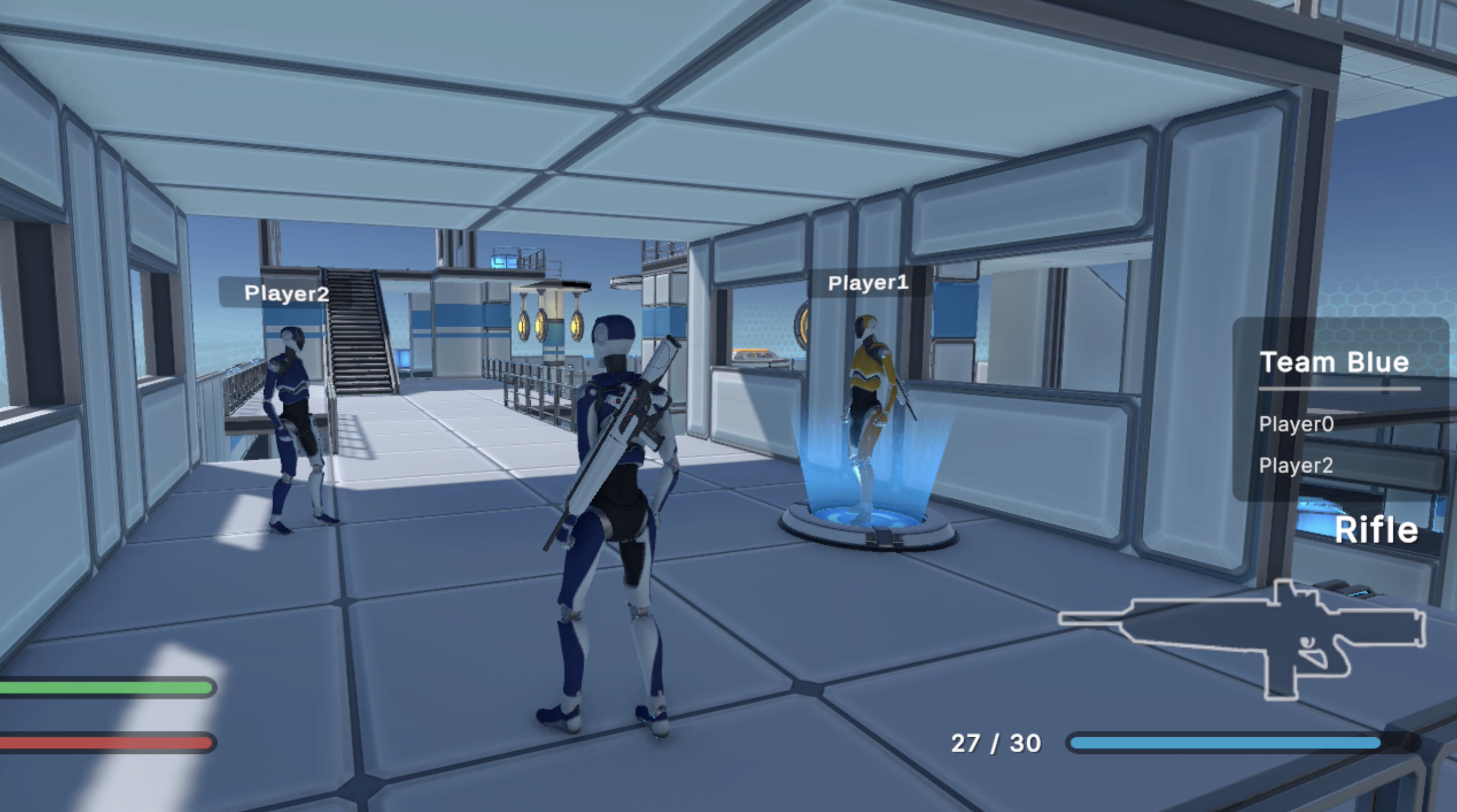
You now have a complete team system:
- Team Storage: Each player's team is synced across the network via
CorePlayerState - Auto-Assignment: Players are evenly distributed to teams on connect
- Team Colors: Player materials reflect their team assignment
- Friendly Fire: Teammates can't damage each other
- Team HUD: Players see their team name and teammates