Double Jump
This tutorial explains how to add a Double Jump capability to your player character. The system is split into two parts:
- Movement Ability: Handles the physical calculation of the jump.
- Player Addon: Handles the input logic and conditions (e.g., checking if the player is already jumping).
Prerequisites: Open the your Player object (e.g., [BB] CorePlayer).
Steps
1. Add the Double Jump Ability
The Ability component handles the physics of the movement.
Inspect your Player object.
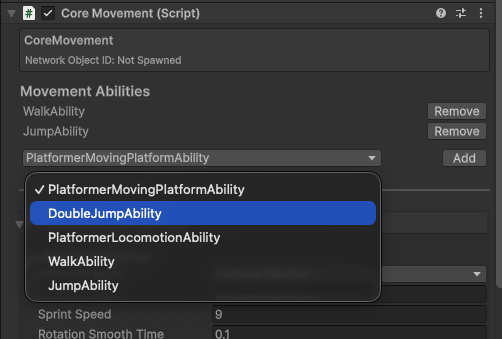
Find the Core Movement (Script) component.
Locate the Movement Abilities section.
In the dropdown, select DoubleJumpAbility.
Click Add.
2. Add the Double Jump Addon
The Addon component handles the input and state management.
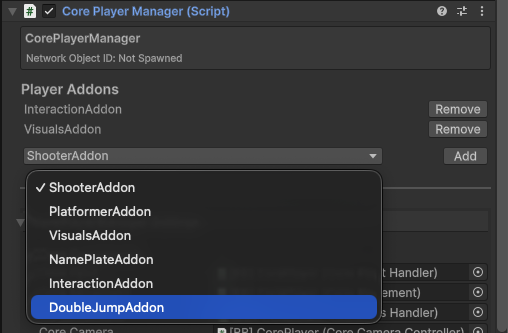
On the same Player object, find the Core Player Manager (Script) component.
Locate the Player Addons section.
In the dropdown, select DoubleJumpAddon.
Click Add.
3. Configure the Addon
Now configure the addon to respond to player input.
Locate the newly added Double Jump Addon (Script) component on your player.
Settings:
- Double Jump Height: Set this to your desired height (e.g.,
2). - Stamina Cost: (Optional) Set a cost if you want to consume stamina.
- Double Jump Height: Set this to your desired height (e.g.,
Input Events:
- On Jump Pressed: Assign the OnJumpPerformed Game Event (found in
Assets/Core/GameEvents/Input/). This connects the input action to the double jump logic.
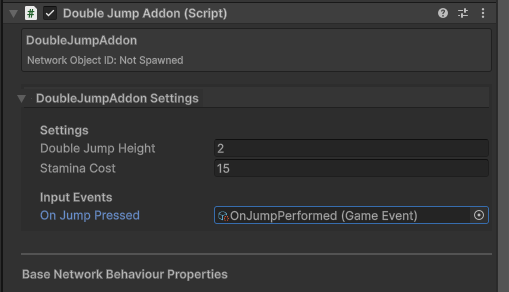
- On Jump Pressed: Assign the OnJumpPerformed Game Event (found in
4. Test
- Enter Play Mode.
- Jump once, then press jump again while in the air.
- Your character should perform a second jump.
Understanding the System
- CoreMovement: The central motor that executes movement. We extended it by adding the
DoubleJumpAbility. - CorePlayerManager: Manages player state. We added the
DoubleJumpAddonto listen for inputs and tellCoreMovementwhen to execute the ability.