Creating a Pickup
This tutorial explains how to create a Pickup item (like a Stamina recharge) that restores a player's stats when they interact with it. You will use the ModularInteractable system to detect players and apply effects.
Prerequisites: Open the Core scene.
Steps
Create the Object
- Create a new visual object (e.g., a Cylinder) in your scene to represent the pickup.
- Ensure it has a Collider.
- Add a NetworkObject component to it. This is required for networked interactions.
Add Movement (Optional)
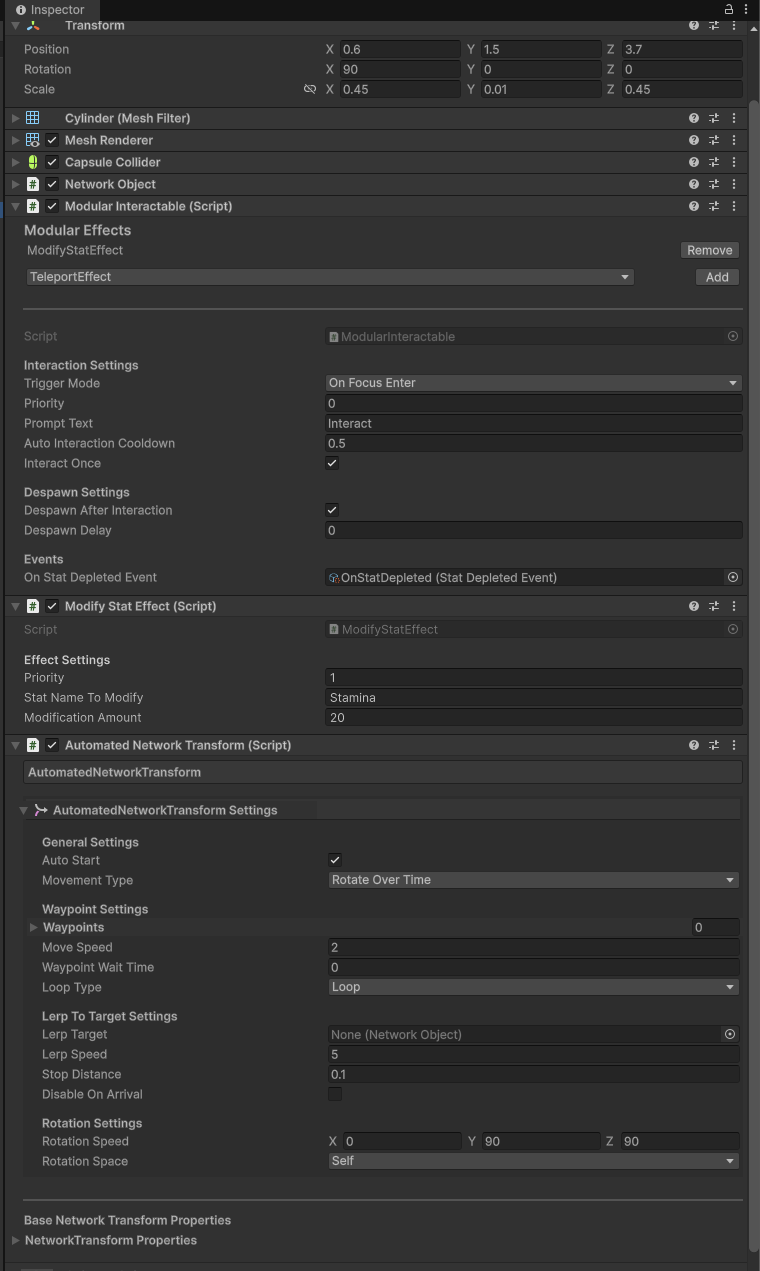
- Add the AutomatedNetworkTransform component to make the pickup rotate or float.
- Movement Type: Check Rotate Over Time.
- Rotation Speed: Set Y to
90(or your preferred speed).
Add Network Object
- Add the NetworkObject component to it. This is required for networked interactions.
Add the Modular Interactable Component
- Add the ModularInteractable component to your object.
- Trigger Mode: Set this to On Focus Enter. This triggers the effect when the player gets close to the object.
- Enable the Despawn After Interaction option to remove the object after it is picked up.
- Change the despawn delay to
0to remove it immediately. - See image for reference.
Add Interaction Effects In the Modular Effects section of the inspector, click the dropdown to add the following effects:
- Modify Stat Effect:
- Stat Name To Modify:
Stamina - Modification Amount:
25(Positive restores stamina).
- Stat Name To Modify:
- Modify Stat Effect:
Test in Multiplayer
- Enter Play Mode.
- Run around and jump to deplete your Stamina.
- Go near the cylinder pickup. You should see your Stamina increase.
Analyzing Examples
- Look for the DamageArea object in the scene.
- It uses the same logic but with Modification Amount set to
-100on Health, which eliminates the player.