Lenses
SensorSDK can emulate camera lenses in the Unity editor. Lenses use a LensComponent and bind to a compatible SystemGraph node, such as PhotoSensorArray.
Thin lens
The thin lens implements a lens component that reproduces a thin lens model. This lens is commonly used in game development.
Brown-Conrady lens
This lens applies a post processing effect on the camera. It renders at a higher resolution and higher field of view to support distortion without creating artifacts or black borders around the image.
The implementation is a Brown-Conrady model used to calculate the distorted pixels from undistorted pixels. The lens uses the following formula:
![$$x_u = x_d + (x_d-x_c)[k_1r^2 + k_2r^4 + k_3r^6 + k_4r^8] + T(x_d, x_c; p_1.., p_4)$$](../images/BrownConrady.png)
with the following variables:
 is the center of distortion.
 are the radial distortion parameters and
  are the distorted and undistorted points respectively.
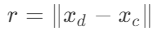 is a tangential distortion parameter.
 is a tangential distortion parameter.
 represents the following function:
![$$T^{0}(x_d, x_c) = [p_1 [r^2 + 2(x_d^0 - x_c^0)^2] + 2p_2(x_d^0 - x_c^0)(x_d^1 - x_c^1)](1 + p_3r^2 + p_4r^4)$$](../images/BrownConradyT0.png)
![$$T^{1}(x_d, x_c) = [p_2 [r^2 + 2(x_d^1 - x_c^1)^2] + 2p_1(x_d^0 - x_c^0)(x_d^1 - x_c^1)](1 + p_3r^2 + p_4r^4)$$](../images/BrownConradyT1.png)
 refers to the nth coordinate of the corresponding vector
Segmentation lens
This lens generates a label value for each object in the scene, instead of an intensity or color image. This lens is solely used as a ground truth. For example, you can use this to train a machine learning algorithm that segments a scene into objects.
For an example of how to use the segmentation lens, see the segmentation camera page.