The Selection Groups Window
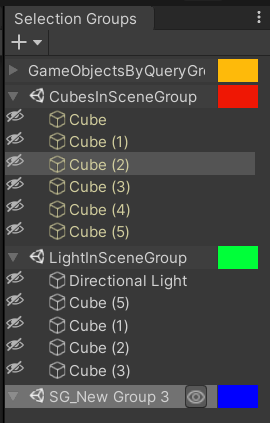
The Selection Groups window shows all groups and their group members in the scene.
We can do the following operations in the window.
| Operations | How |
|---|---|
| Create an empty group | Click the + button and select "Create Empty Group". |
| Create a group using selected objects | Click the + button and select "Create Group from Selection". |
| Delete a group | Select a group and press the Delete key, or right click on the group and choose "Delete Group". |
| Change a group order | Select a group and drag it to the desired order in the window. |
| Add group members | Drag GameObjects from the Hierarchy window, assets from the Project window, or members of other groups, into the applicable group. |
| Move group members | Select members of other groups, and drag them while pressing any Control key into the applicable group. |
| Remove group members | Select the group members and press the Delete key, or right click on the group and choose "Remove From Group". To clear all members, right click on the group and choose "Clear Group". |
| Select all group members | Double click on the group, or right click on the group and choose "Select All Group Members". To select all members of all groups, go to Edit > Select All. |
We can also use the following key modifiers to maintain the current selection when clicking on a group member.
| Key | Use |
|---|---|
| Ctrl | Add the group member into the current selection. |
| Ctrl+Shift | Add group members from the last selected member to the clicked member into the current selection. |
Groups with Query:
The members of a group which has its GameObject Query (GoQL) property set will be shown in yellow, and both adding and removing members from this group are not allowed.