Ambient Occlusion
The Ambient Occlusion override is a real-time, full-screen lighting effect available in the High Definition Render Pipeline (HDRP). This effect approximates ambient occlusion in the current field of view. It approximates the intensity and position of ambient light on a GameObject’s surface, based on the light in the Scene and the environment around the GameObject. To achieve this, it darkens creases, holes, intersections, and surfaces that are close to one another. In real life, these areas tend to block out, or occlude, ambient light, and therefore appear darker.
Using Ambient Occlusion
Ambient Occlusion uses the Volume framework, so to enable and modify Ambient Occlusion properties, you must add an Ambient Occlusion override to a Volume in your Scene. To add Ambient Occlusion to a Volume:
- In the Scene or Hierarchy view, select a GameObject that contains a Volume component to view it in the Inspector.
- In the Inspector, navigate to Add Override > Lighting and click on Ambient Occlusion. HDRP now applies Ambient Occlusion to any Camera this Volume affects.
Properties
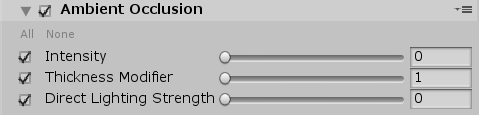
| Property | Description |
|---|---|
| Intensity | Use the slider to set the strength of the ambient occlusion effect. |
| Thickness Modifier | Use the slider to modify the thickness of occluders. This increases the size of dark areas, but can potentially introduce dark halos around Meshes. |
| Direct Lighting Strength | Use the slider to change how much the ambient lighting affects occlusion. |
Details
Ambient occlusion is a screen-space effect, so it only processes what is on the screen at a given point in time. This means that objects outside of the field of view cannot visually occlude objects in the view. You can sometimes see this on the edges of the screen.