 Bevel (Edge)
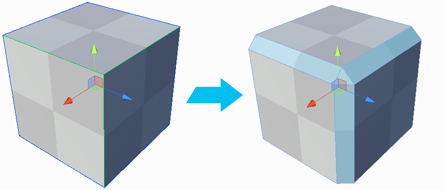
The Bevel Edge action splits the selected edge(s) into two edges, with a new face between.
Tip: You can also launch this action from the ProBuilder menu (Tools > ProBuilder > Geometry > Bevel Edges).
Bevel Options

To change the width of the bevel, change the Distance to move the newly created edge(s) from the position of the original edge(s). This becomes the width of the new face(s).