Respond to sign-in events
When attempting to access an account on some platforms, such as the default account, user input is often requested. You can simulate this behavior with the Play Mode Controls window.
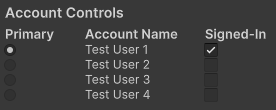
Example of the Account Controls in the Play Mode Controls window
Selecting an account as Primary will automatically sign the account in.
Note
You might be able to sign in multiple accounts depending on the platform you're targeting. You can use Behaviors to simulate different platform capabilities. For more information, refer to Simulate platform system behaviors.
The signed in state for account is persistent when entering and exiting Play mode. Some platforms will select an account that's already signed in when calling for the primary account. If you want to minimize interaction with this window while testing your game in the Unity Editor, configure the signed-in and primary account ahead-of-time using the Play Mode Controls window.