Create and configure test accounts
To support testing games using the Platform Toolkit package, you can create and manage test accounts with customizable data.
Note
To access the following control settings, you must have a Play Mode Controls Settings asset in your project. For more information on how to create this asset, refer to Create a Play Mode Controls Settings asset.
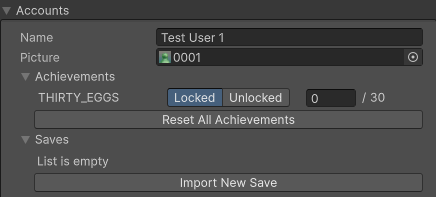
Example of a test account inside Play Mode Controls Settings.
Create a test account
A Play Mode Controls Settings asset file contains pre-configured information for four test accounts. You can add or remove test accounts as required.
Configure test accounts
To configure test accounts:
- Navigate to Window > Platform Toolkit > Play Mode Controls to open the Play Mode Controls window.
- Select Test Account Data.
- In the Accounts section configure data for each test account as required.
You can set and modify the following data for each account:
- An account name
- A profile picture
- Unlock specific achievements
- Manage save files
For more information, refer to Play Mode Controls Settings reference.
Note
When in Play mode, you can't edit information in the Play Mode Controls Settings asset.