Configure achievements with the Achievement Editor
Use the Achievement Editor to create and configure achievements in your game.
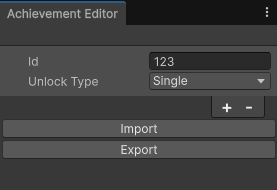
Example of the Achievement Editor Window with a Single achievement type
Use the following steps to add achievements to your project:
- In the Unity Editor, navigate to Window > Platform Toolkit > Achievement Editor.
- Add achievements by selecting the Add (+) button.
- Enter a unique ID for each achievement, and a corresponding ID for each platform you want to target.
- Set the Unlock Type to one of the following options.
- Single: For achievements that are unlocked once.
- Progressive: For achievements that track a progress value.
- For Progressive achievements, set a Progress Target value. This is the progress value at which achievement is unlocked.
A warning icon might appear next to each platform or achievement ID if there are any issues with the configuration. Hover over the icon to display details about the issue. If a warning appears next to an ID for a platform you're not currently targeting, open the More (⋮) menu and select Toggle Ignore to dismiss the warning.
Note
For platforms that don't support progressive achievements, this behavior is handled by the Platform Toolkit API. Refer to the scripting documentation for more information.