Reloading Code
Update C# methods with the [MethodReload] attribute without restarting Play Mode in the editor or rebuilding the Player. Two backends are supported:
| Command | Backend | Where | Language | Pipeline server needed in player |
|---|---|---|---|---|
script.methodreload reload |
Assembly.Load (default) |
Editor Play Mode, Desktop Mono dev builds | Full C# | yes |
script.methodreload reload_editor, script.methodreload reload_player |
IlInterpreter | Any dev build, including IL2CPP | A C# subset (see constraints) | no |
The watch UI and device pushes always use the interpreter: an IL2CPP player has no Roslyn and no Assembly.Load, so the editor compiles and the device interprets. Method reload lives in the Unity.Pipeline assembly, which is only compiled into the builds the Project Settings → Pipeline → Runtime toggles select, so a build with those off contains none of it (see runtime-setup.md). [MethodReload] itself lives in the unconstrained Unity.Pipeline.Attributes assembly, so a tagged method still compiles for a release build; it simply runs its original body, with no dispatch prologue woven in.
Working examples: the
Method Reload Examplessample ships in the separatecom.unity.pipeline.samplespackage — a minimal in-place reload and a reloadable Pong game. See Samples.
Tagging a method
Tag the method you want to reload with [MethodReload]:
using Unity.Pipeline.MethodReload;
using UnityEngine;

public class Spinner : MonoBehaviour
{
    public float rotationSpeed = 90f;

    [MethodReload]
    public void Update()
    {
        transform.Rotate(Vector3.up, rotationSpeed * Time.deltaTime);
    }
}
The attribute must be there before entering Play Mode or building a player, because the dispatch check is woven in at compile time (see How it works). Edit the body of Update, then apply the file with one of the commands below. The running instance picks up the new body.
Constraints. The [MethodReload] method must be public (instance or static) and must return void or System.Collections.IEnumerator (a coroutine). Methods returning anything else are skipped at build time with a warning. The Assembly.Load backend adds one more rule, described in its section: the body may only touch public members of its host type.
Supported changes
New methods: a reload can declare a method the compiled type doesn't have yet and call it from a reloaded body (instance and static methods, expression bodies included; not generics, properties, or fields). A new method cannot be a reload entry point — nothing compiled calls it until the next real compile — so tagging it [MethodReload] registers nothing for it (the reload response says so) while the rest of the file still applies.
Method groups and delegates: a reloaded body can pass a method as a callback — _root.Add(new Button(Click)), button.clicked += Click, RegisterCallback<ClickEvent>(OnClick) — whether the method already exists compiled or was just added, and event -= unsubscribes as expected. Lambdas and closures work too, and delegate values combine (a += b on an Action local/field). Limits: at most 4 delegate parameters and no ref/out parameters. One caveat for a method group over a new method: the receiver is evaluated when the delegate fires, not captured at subscription, and -= of such a group won't match the +=.
Coroutines: a [MethodReload] IEnumerator method picks up the new body at iterator creation — each StartCoroutine call uses the latest reload, while coroutines already running keep executing the body they were created from (use [OnMethodReloaded] to stop/restart long-lived ones). yield return null, WaitForSeconds, and nested coroutines all work; IEnumerable/generic iterator returns are not supported. Two caveats: an exception thrown inside a reloaded coroutine body surfaces from the coroutine scheduler with no automatic fallback to the original body (unlike void methods), and on the interpreter backend a try/finally around a yield runs its finally on the normal path and on Dispose, but not when the body throws. Coroutines are the main use case for the [OnMethodReloaded] callbacks described below.
Reload callbacks — [OnMethodReloaded]
Tag a parameterless instance method with [OnMethodReloaded] to run code after a reload lands — a place to re-initialize state the swapped code depends on (think a domain-reload-free OnEnable):
[OnMethodReloaded]
void OnMethodReloaded()
{
    StopAllCoroutines();
    StartCoroutine(MainLoop()); // restart so the loop picks up the new body
}
It fires once per reload that changes at least one method on the declaring type, on every live instance (UnityEngine.Object-derived types only), on the main thread. Exceptions are logged, not propagated. Both backends and the watcher trigger it. Typical uses: restarting long-lived coroutines, disabling and re-enabling MonoBehaviours, and refreshing caches computed by the old code.
Assembly.Load backend: the script.methodreload reload command
This backend compiles the edited C# in the process that runs it, so reloading in a player does not need a running editor. It does need the runtime Pipeline server in the player, since the command arrives over HTTP.
unity command script.methodreload reload "<absolute path>/Spinner.cs"

# Emit debug symbols so breakpoints bind (compiles unoptimized):
unity command script.methodreload reload "<absolute path>/Spinner.cs" --pdb
script.methodreload reload parameters:
| Arg | Default | Meaning |
|---|---|---|
filename |
(required) | Source file containing [MethodReload] methods. |
timeout |
60 |
Compilation timeout (seconds). |
assemblyDir |
null |
Optional directory to also save the compiled assembly to disk (default: in-memory only). |
pdb |
false |
Emit a portable PDB mapped to the original source so debugger breakpoints bind. Compiles unoptimized. |
Public members only. The reloaded body may only access public members of its host type. The compiled code loads as a separate assembly and Mono enforces accessibility, so a private field or method would fail at dispatch; the reload rejects it up front with the offending members listed.
Interpreter backend: the reload_editor and reload_player commands
The editor compiles the edited file to IL, and the IlInterpreter runs that IL where the reload lands: in the editor process, or in a connected player. No Assembly.Load is involved, so this backend works in IL2CPP players. Both commands compile in the editor, so reloading a player needs the editor running and the player connected.
Editor interpreter
script.methodreload reload_editor is the same as script.methodreload reload, but the reloaded methods run through the interpreter in the editor process. Use it to check that an edit stays within the interpreter's subset and host surface before pushing it to a device.
unity command script.methodreload reload_editor "<absolute path>/Spinner.cs"
The parameters are listed in the command reference.
The public-members-only constraint of script.methodreload reload does not apply: the interpreter reaches private members by reflection.
Player interpreter
script.methodreload reload_player compiles a file's (or a folder's) [MethodReload] methods in the editor and pushes the IL to connected development players over PlayerConnection (the Profiler's channel, so no open port is needed and it tunnels over USB). Folders are walked recursively; a .cs file is only compiled if it mentions MethodReload, and files that don't are skipped rather than reported as errors.
# Compile a file's [MethodReload] methods and push to every connected player
unity command script.methodreload reload_player "Assets/Scripts/Player.cs"

# Push a whole folder, targeting one player by id (-1 = broadcast, the default)
unity command script.methodreload reload_player "Assets/Scripts" --player 2
The parameters are listed in the command reference.
Points to know:
- The push compiles with the player's preprocessor defines, not the editor's.
- The player needs the runtime Pipeline driver enabled (see Runtime connection & setup); the HTTP server is not required.
- The response reports the compile result and any host-surface members the pushed code uses that the player does not expose (see Available APIs). The player acks the apply asynchronously to the editor console.
- Unlike the watcher, the command pushes every tagged method in the file, not just the ones that changed. That is the escape hatch when the connected player was not built from the sources you are editing.
Interpreter constraints
The Assembly.Load backend runs plain C# — anything Roslyn compiles works. The interpreter backend does not: it executes a C# subset against a fixed host surface. The subset is checked before the code runs; the host surface only bites at runtime, on a device.
Language subset. The shipped Roslyn analyzer (diagnostics MR002–MR023) marks violations in your IDE, on [MethodReload] method bodies only. Not supported:
await/Task,try/catch/finally,lock, LINQ query syntax (from x in …),checkeddecimal,dynamic, reflection types (Type,MethodInfo, …), threading typesref/out/inparameters,refreturns and locals, multi-dimensional arrays (int[,]— jaggedint[][]is fine), generic methods- declaring static fields, value-type nullables (
T?), new type declarations inside the file,yieldin a local function
long, ulong, and double work (the VM runs them in 64-bit slots). Lambdas, closures, delegates, goto, string interpolation, and coroutine yield all work — see the delegate and coroutine notes above for their edges.
Available APIs. Interpreted code can only call the UnityEngine/BCL members the interpreter exposes, plus the reloaded type's own members. In the editor, missing members bind on demand; on a device they cannot (IL2CPP strips unreferenced code), so an unexposed member throws when the reloaded code reaches it. A device push checks this up front and lists the missing members as warnings in the push response: … not in the binding and will throw if reached.
Keeping more code on the device. If a push warns about a member the game itself never calls, the build has stripped it. You can keep more, either by curating a link.xml file as usual, or by letting the package generate one:
- Open Project Settings → Pipeline → Runtime and, in the Method Reload section, click Generate link.xml (or run
script.methodreload generate_link_xml). - Rebuild the player.
The file keeps every member of the types your game already uses, so reloaded code can call any of them. It does not keep types the game never touches; for those, add your own link.xml under Assets/. Regenerate the file after larger code changes; a build for a different platform than the one it was generated for refreshes it on its own. Details, including where the file lives and when it applies, are in Runtime connection & setup.
Watching for changes
Instead of running script.methodreload reload_player or script.methodreload reload_editor by hand, let the editor watch for saves: Project Settings → Pipeline → Editor → Method Reload Interpreter Watch → Start Watching. The watch covers the whole Assets tree; a saved .cs only compiles if it mentions MethodReload.
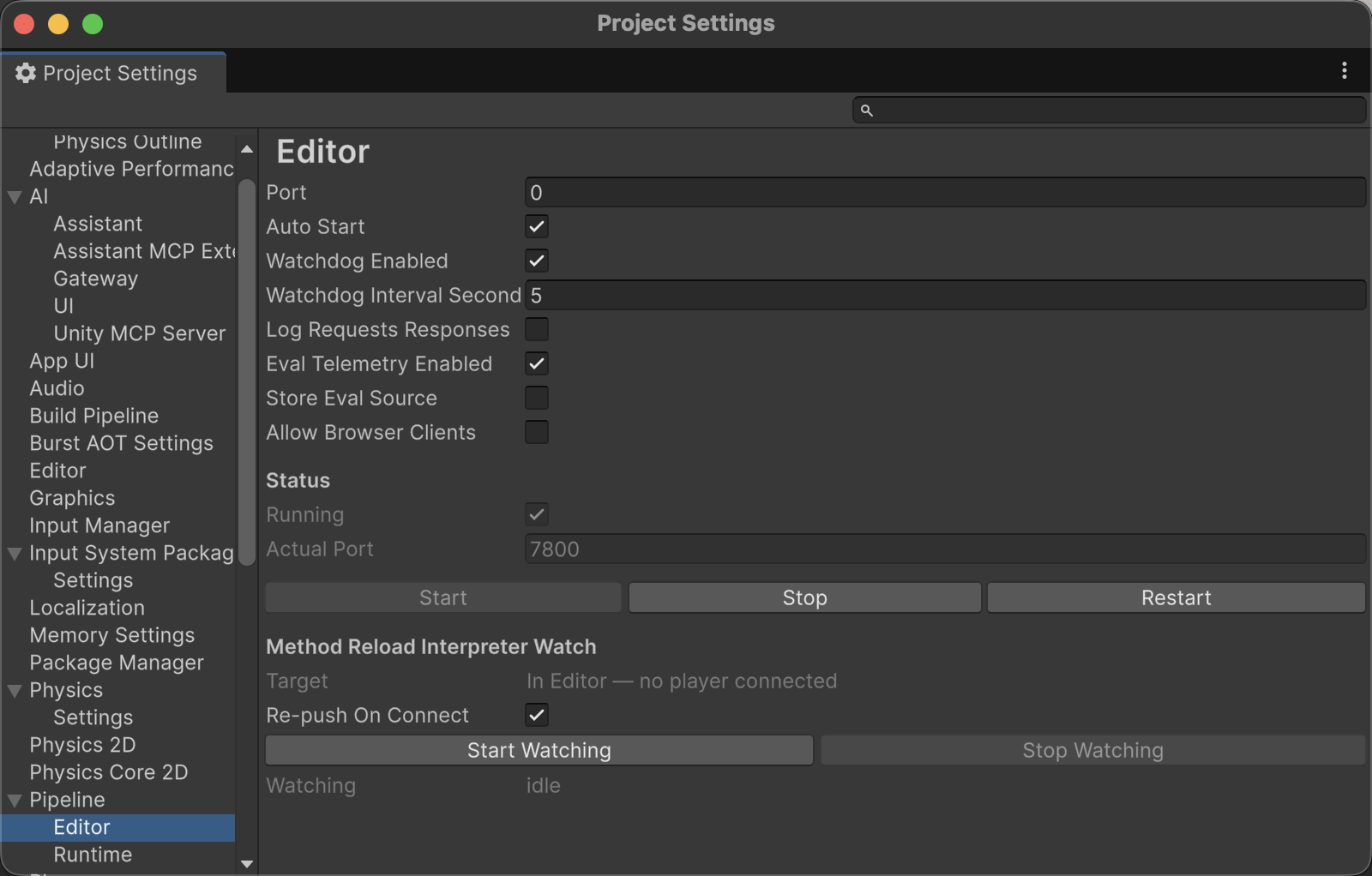
Each save picks its target automatically:
- A development player is connected (Autoconnect Profiler, or attached via Profiler/Console) → the save compiles in the editor and is pushed to every connected player over PlayerConnection, always on the interpreter backend.
- No player → the save applies in this editor process, also on the interpreter backend.
Plugging in or disconnecting a device mid-watch reroutes the next save; no restart needed.
The workflow: start the watch, enter Play Mode, edit [MethodReload] bodies, save. Points to know:
- Auto-refresh is off while watching, so a save reloads instead of triggering a domain reload. Other assets won't import until you refresh manually (Cmd/Ctrl+R). Stop Watching restores your setting.
- Only methods that changed since the watch started reload; untouched ones keep running compiled.
- The watch survives domain reloads, re-applies reloads that a Play Mode domain reload wiped, and re-pushes state to a player that reconnects (a restarted player boots the original code) — governed by the Re-push On Connect setting.
- The inspector shows liveness: watcher event count, last apply, and the resolved target. Compile errors and binding warnings land in the Console.
To push once without a watch, run script.methodreload reload_player directly (see Player interpreter).
How it works
Every [MethodReload] method gets a small check woven in when your project builds: on each call it runs the latest reloaded body if one exists, otherwise the original. That is why edits apply without touching call sites, and why a reload only ever changes tagged methods.
An applied reload compiles the edited source in memory; nothing is written to disk unless you pass assemblyDir. The result then either loads next to the original assembly (Assembly.Load backend, Mono only) or is executed by the interpreter (works everywhere, including IL2CPP).
Supporting commands
script.methodreload status— list which methods currently have a reload applied.script.methodreload cleanup— delete saved reload assemblies and revert every method to its compiled body.
See also
- Runtime connection & setup — enabling method reload in a Player build.
- Method reload on IL2CPP devices and managed stripping — the generated
link.xmlthat keeps more code reachable on a device. - Command reference