NetworkObject ownership
Manage NetworkObject ownership across different network topologies.
Before reading these docs, ensure you understand the concepts of ownership and authority within Netcode for GameObjects. It's also recommended to be familiar with the NetworkObject and NetworkBehaviour. Ownership behaves slightly differently based on your game's chosen network topology.
Read more about how to detect when ownership has changed in NetworkBehaviour ownership.
Helpful properties
Note
All NetworkObject properties are only valid while the NetworkObject is spawned. Use NetworkObject.IsSpawned to check the spawned status of the NetworkObject.
To identify whether the local client is the owner of a NetworkObject, you can check theNetworkObject.IsOwner or the NetworkBehaviour.IsOwner property.
To identify whether the server owns a NetworkObject, you can check the NetworkObject.IsOwnedByServer or the NetworkBehaviour.IsOwnedByServer property.
Note
To assure a spawned NetworkObject persists after the owner leaves a session, set the NetworkObject.DontDestroyWithOwner property to true. This assures the client-owned NetworkObject doesn't get destroyed when the owning client leaves.
Ownership on spawn
When building a client-server game, only the server has the authority to spawn objects. In a distributed authority game, any connected client can spawn objects.
The default NetworkObject.Spawn method sets server-side ownership in a client-server topology. When using a distributed authority topology, this method sets the client who calls the method as the owner.
var NetworkObject = GetComponent<NetworkObject>.Spawn();
Spawn with ownership
To spawn a NetworkObject that's owned by a different game client than the one doing the spawning, use the following:
NetworkObject.SpawnWithOwnership(clientId);
Note
Using SpawnWithOwnership can result in unexpected behavior when the spawning game client makes any other changes on the object immediately after spawning.
Using SpawnWithOwnership and then editing the NetworkObject locally means that the client doing the spawning will behave as the spawn authority. The spawn authority has limited local authority over the NetworkObject, but not ownership of the NetworkObject that's spawned. This means any owner-specific checks during the spawn sequence will not be invoked on the spawn authority side.
If you want to spawn a NetworkObject for another client and then immediately make adjustments to that NetworkObject, it's recommended to use the Spawn method. After adjusting, the spawn authority can immediately follow with a call to ChangeOwnership.
public class BreakableSpawner : NetworkBehaviour
{
    private GameObject breakablePrefab;

    [Rpc(SendTo.Authority)]
    public void SpawnNewBreakableRpc(RpcParams rpcParams = default) {
        var instance = Instantiate(breakablePrefab).GetComponent<NetworkObject>();
        instance.Spawn();

        // Here we can set the initial values despite the object being owner authoritative.
        instance.transform.position = transform.position;
        instance.GetComponent<Breakable>().RemainingHealth.Value = 20;

        instance.ChangeOwnership(rpcParams.Receive.SenderClientId);
    }
}

public class Breakable : NetworkBehaviour
{
    // Note: This NetworkVariable is owner authoritative
    public NetworkVariable<int> RemainingHealth = new NetworkVariable<int>(writePerm: NetworkVariableWritePermission.Owner);

    public override void OnNetworkSpawn()
    {
        if (IsOwner)
        {
            // SpawnWithOwnership() will not invoke this code on initial spawn.
        }
        base.OnNetworkSpawn();
    }
}
This flow allows the spawning client to completely spawn and finish initializing the NetworkObject locally before transferring the ownership to another game client.
Authority ownership
If you're creating a client-server game and you want a client to control more than one NetworkObject, or if you're creating a distributed authority game and the authority/current owner of the object would like to change ownership, use the following ownership methods.
To change ownership, the authority uses the ChangeOwnership method:
NetworkObject.ChangeOwnership(clientId);
Use spawn with ownership to spawn objects for other game clients.
Client-server ownership
In a client-server game, the server is always the authority of ownership changes. Clients cannot change ownership, the server can interact with ownership as outlined above in authority ownership. Additionally in a client-server game, ownership can be given back to the server using the RemoveOwnership method:
NetworkObject.RemoveOwnership();
Distributed authority ownership
In a distributed authority topology, the owner of a NetworkObject is always the authority for that NetworkObject. Because the simulation is shared between clients, it's important that ownership can be easily passed between game clients. This enables:
- Evenly sharing the load of the game simulation by redistributing NetworkObjects whenever a player joins or leaves.
- Allowing ownership to be transferred immediately to a client in situations where the client is interacting with that NetworkObject to remove lag from those interactions.
- Controlling when a NetworkObject is safe or valid to be transferred.
The authority of any NetworkObject can always change ownership, as outlined in authority ownership.
Ownership permission settings
The following ownership permission settings, defined by NetworkObject.OwnershipStatus, control how ownership of NetworkObjects can be changed during a distributed authority session:
| Ownership setting | Description | Related Property | Multi-select |
|---|---|---|---|
None |
Ownership of this NetworkObject can't be redistributed, requested, or transferred (a Player might have this, for example). | No | |
Distributable |
Ownership of this NetworkObject is automatically redistributed when a client joins or leaves, as long as ownership is not locked or a request is pending. | IsOwnershipDistributable |
Yes |
Transferable |
Any client can change ownership of this NetworkObject at any time, as long as ownership is not locked or a request is pending. | IsOwnershipTransferable |
Yes |
RequestRequired |
Ownership of this NetworkObject must be requested before ownership can be changed. | IsOwnershipRequestRequired, IsRequestInProgress |
Yes |
SessionOwner |
This NetworkObject is always owned by the session owner and can't be transferred or distributed. If the session owner changes, this NetworkObject is automatically transferred to the new session owner. | IsOwnershipSessionOwner |
No |
Ownership permissions can be set in the editor using the Ownership dropdown.
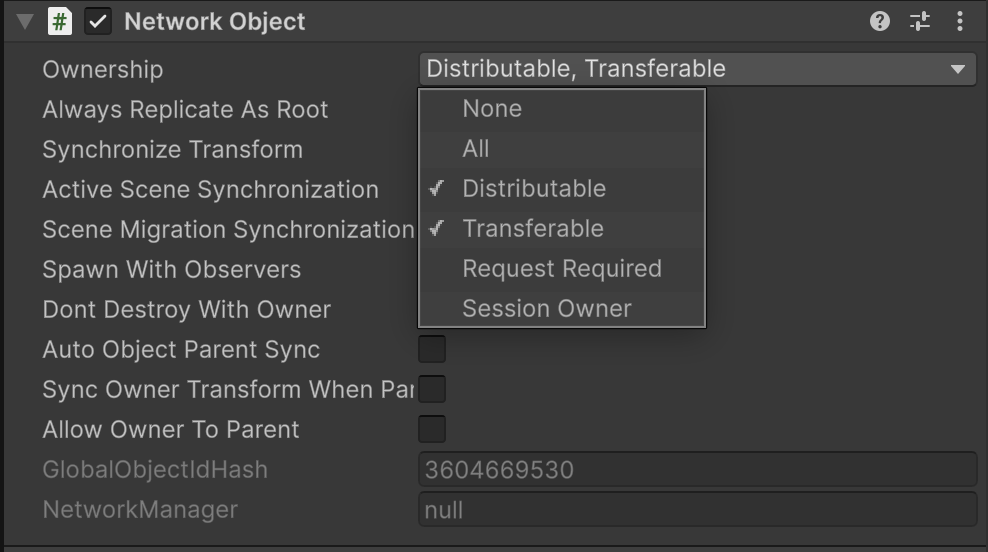
They can also be set in script using
You can also use NetworkObject.SetOwnershipLock to lock and unlock the permission settings of a NetworkObject for a period of time, preventing ownership changes on a temporary basis. The IsOwnershipLocked property can be used to detect if an object has locked ownership.
// To lock an object from any ownership changes
NetworkObject.SetOwnershipLock(true);

// To unlock an object so that the underlying ownership permissions apply again
NetworkObject.SetOwnershipLock(false);
Changing ownership in distributed authority
When a NetworkObject is set with OwnershipPermissions.Transferable any client can change ownership to any other client using the ChangeOwnership method:
NetworkObject.ChangeOwnership(clientId);

// To change ownership to self
NetworkObject.ChangeOwnership(NetworkManager.LocalClientId);
When a non-authoritative game client calls ChangeOwnership, the ownership change can fail. On a failed attempt to change ownership, the OnOwnershipPermissionsFailure callback will be invoked with a NetworkObject.OwnershipPermissionsFailureStatus to give information on the failure.
/*
* When the NetworkObject's permissions includes the OwnershipPermissions.Transferrable flag.
*/
public class ChangeOwnershipBehaviour : NetworkBehaviour
{
    public override void OnNetworkSpawn()
    {
      NetworkObject.OnOwnershipPermissionsFailure += OnOwnershipPermissionsFailure;
      base.OnNetworkSpawn();
    }

    public void TakeOwnership()
    {
        if (!IsOwner) {
            NetworkObject.ChangeOwnership(NetworkManager.LocalClientId);
        }
    }

    // Override this method on the NetworkBehaviour to detect ownership changes
    protected override void OnOwnershipChanged(ulong previous, ulong current)
    {
        if (IsOwner)
        {
            // If this is invoked, then the ownership change succeeded!
        }
        base.OnOwnershipChanged(previous, current);
    }

    private void OnOwnershipPermissionsFailure(NetworkObject.OwnershipPermissionsFailureStatus ownershipPermissionsFailureStatus)
    {
        // If this is invoked then the ownership change failed.
    }

    public override void OnNetworkDespawn()
    {
        NetworkObject.OnOwnershipPermissionsFailure += OnOwnershipPermissionsFailure;
        base.OnNetworkDespawn();
    }
}
Requesting ownership in distributed authority
When a NetworkObject is set with OwnershipPermissions.RequestRequired any client can request the ownership for themselves using the RequestOwnership method:
var requestStatus = NetworkObject.RequestOwnership();
RequestOwnership returns an OwnershipRequestStatus to indicate the initial status of the request. To view the result of the request, the OnOwnershipRequestResponse callback will be invoked with a NetworkObject.OwnershipRequestResponseStatus.
By default, any requests for ownership will automatically be approved. To control which client is approved for ownership, use the OnOwnershipRequested callback
/*
* When the NetworkObject's permissions includes the OwnershipPermissions.RequestRequired flag.
*/
public class RequestableOwnershipBehaviour : NetworkBehaviour
{
    public override void OnNetworkSpawn()
    {
        NetworkObject.OnOwnershipRequested += OnOwnershipRequested;
        NetworkObject.OnOwnershipRequestResponse += OnOwnershipRequestResponse;
        base.OnNetworkSpawn();
    }

    public void TakeOwnership()
    {
        if (IsOwner)
        {
            return;
        }

        var requestStatus = NetworkObject.RequestOwnership();
        if (requestStatus == NetworkObject.OwnershipRequestStatus.RequestSent)
        {
            // Request was sent to the owning client!
        }
        else
        {
            // Request failed to send. Use the requestStatus variable to investigate the failure to send.
        }
    }

    private bool OnOwnershipRequested(ulong requestingClientId)
    {
        // The existing owner of the object can use this callback to choose whether the request is accepted.
        return true;
    }

    private void OnOwnershipRequestResponse(NetworkObject.OwnershipRequestResponseStatus ownershipRequestResponseStatus)
    {
        if (ownershipRequestResponseStatus == NetworkObject.OwnershipRequestResponseStatus.Approved)
        {
            // The ownership request was approved and current client now owns this object!
        }
        else
        {
            // The ownership request either failed or was denied. Use the ownershipRequestResponseStatus variable to investigate the failure.
        }
    }

    public override void OnNetworkDespawn()
    {
        NetworkObject.OnOwnershipRequested -= OnOwnershipRequested;
        NetworkObject.OnOwnershipRequestResponse -= OnOwnershipRequestResponse;
        base.OnNetworkDespawn();
    }
}