Unity ML-Agents Gym Wrapper
A common way in which machine learning researchers interact with simulation environments is via a wrapper provided by the Farama Foundation called gymnasium (formerly known as OpenAI gym). For more information on the gymnasium interface, visit the Gymnasium Documentation, and the Gymnasium Github repository.
The ML Agents package provides a gym wrapper and instructions for using it with existing machine learning algorithms which utilize gymnasium. This wrapper provides interfaces on top of the UnityEnvironment class, which is the default way of interfacing with a Unity environment via Python.
Installation
The gym wrapper is part of the mlagents_envs package. Please refer to the mlagents_envs installation instructions.
Using the Gym Wrapper
The gym interface is available from mlagents_envs.envs.unity_gym_env. To launch an environment from the root of the project repository use:
from mlagents_envs.envs.unity_gym_env import UnityToGymWrapper

env = UnityToGymWrapper(unity_env, uint8_visual, flatten_branched, allow_multiple_obs)
unity_envrefers to the Unity environment to be wrapped.uint8_visualrefers to whether to output visual observations asuint8values (0-255). Many common Gym environments (e.g. Atari) do this. By default, they will be floats (0.0-1.0). Defaults toFalse.flatten_branchedwill flatten a branched discrete action space into a gymnasiumDiscretespace. Otherwise, it will be converted into aMultiDiscrete. Defaults toFalse.allow_multiple_obswill return a list of observations. The first elements contain the visual observations and the last element contains the array of vector observations. If False the environment returns a single array (containing a single visual observations, if present, otherwise the vector observation). Defaults toFalse.action_space_seedis the optional seed for action sampling. If non-None, will be used to set the random seed on created gym.Space instances.
The returned environment env will function as a gymnasium environment.
Limitations
- It is only possible to use an environment with a single Agent.
- By default, the first visual observation is provided as the
observation, if present. Otherwise, vector observations are provided. You can receive all visual and vector observations by using theallow_multiple_obs=Trueoption in the gym parameters. If set toTrue, you will receive a list ofobservationinstead of only one. - The
TerminalStepsorDecisionStepsoutput from the environment can still be accessed from theinfoprovided byenv.step(action). - Stacked vector observations are not supported.
- Environment registration for use with
gym.make()is currently not supported. - Calling env.render() will not render a new frame of the environment. It will return the latest visual observation if using visual observations.
Training with Stable-Baselines3
Stable-Baselines3 (SB3) is a set of reliable, actively maintained implementations of reinforcement learning algorithms in PyTorch. It is the community successor to OpenAI Baselines and, like this wrapper, is built on the Farama Foundation gymnasium API, so you can train ML-Agents environments with it directly.
Install SB3 with:
pip install stable-baselines3
Example - PPO
To train an agent with PPO on a single-agent environment, create a file called train_unity.py with the following code. Then create an /envs/ directory and build the environment to that directory. For more information on building Unity environments, refer to Using an Environment Executable.
from stable_baselines3 import PPO

from mlagents_envs.environment import UnityEnvironment
from mlagents_envs.envs.unity_gym_env import UnityToGymWrapper


def main():
    unity_env = UnityEnvironment(<path-to-environment>)
    env = UnityToGymWrapper(unity_env)
    model = PPO("MlpPolicy", env, verbose=1)
    model.learn(total_timesteps=100000)
    print("Saving model to unity_model.zip")
    model.save("unity_model")


if __name__ == "__main__":
    main()
To start the training process, run the following from the directory containing train_unity.py:
python train_unity.py
Use the MlpPolicy for environments with vector observations, and the CnnPolicy for environments with visual (image) observations.
Example - DQN
DQN requires a discrete action space. For an environment with a single visual observation and branched discrete actions, enable uint8_visual (to output uint8 image observations) and flatten_branched (to collapse the branched action space into a single Discrete space):
from stable_baselines3 import DQN

from mlagents_envs.environment import UnityEnvironment
from mlagents_envs.envs.unity_gym_env import UnityToGymWrapper


def main():
    unity_env = UnityEnvironment(<path-to-environment>)
    env = UnityToGymWrapper(unity_env, uint8_visual=True, flatten_branched=True)
    model = DQN(
        "CnnPolicy",
        env,
        learning_rate=2.5e-4,
        buffer_size=50000,
        learning_starts=20000,
        target_update_interval=50,
        gamma=0.99,
        verbose=1,
    )
    model.learn(total_timesteps=1000000)
    print("Saving model to unity_model.zip")
    model.save("unity_model")


if __name__ == "__main__":
    main()
Training on multiple environments in parallel
SB3 can train on several environment instances at once using a vectorized environment. Each Unity instance must use a distinct base_port so the instances don't conflict:
from stable_baselines3 import PPO
from stable_baselines3.common.vec_env import SubprocVecEnv

from mlagents_envs.environment import UnityEnvironment
from mlagents_envs.envs.unity_gym_env import UnityToGymWrapper


def make_unity_env(env_directory, num_env, start_index=0):
    """Create a wrapped, vectorized Unity environment."""

    def make_env(rank):
        def _thunk():
            unity_env = UnityEnvironment(env_directory, base_port=5000 + rank)
            return UnityToGymWrapper(unity_env)

        return _thunk

    return SubprocVecEnv([make_env(i + start_index) for i in range(num_env)])


def main():
    env = make_unity_env(<path-to-environment>, 4)
    model = PPO("MlpPolicy", env, verbose=1)
    model.learn(total_timesteps=100000)


if __name__ == "__main__":
    main()
Run Google Dopamine Algorithms
[!NOTE] The following walkthrough was written for an older, OpenAI
gym-based release of Dopamine. This wrapper now follows the Farama FoundationgymnasiumAPI:reset()returns(observation, info)andstep()returns(observation, reward, terminated, truncated, info). Recent versions of Dopamine targetgymnasiumand are compatible with the wrapper, but the exact file names, module paths, and configuration steps described here may differ from the version you install. Treat this section as a general guide rather than a step-by-step recipe.
Google provides a framework Dopamine, and implementations of algorithms, e.g. DQN, Rainbow, and the C51 variant of Rainbow. Using the Gym wrapper, you can run Unity environments using Dopamine.
First, after installing the Gym wrapper, clone the Dopamine repository.
git clone https://github.com/google/dopamine
Then, follow the appropriate install instructions as specified on Dopamine's homepage. Note that the Dopamine guide specifies using a virtualenv. If you choose to do so, make sure your unity_env package is also installed within the same virtualenv as Dopamine.
Adapting Dopamine's Scripts
First, open dopamine/atari/run_experiment.py. Alternatively, copy the entire atari folder, and name it something else (e.g. unity). If you choose the copy approach, be sure to change the package names in the import statements in train.py to your new directory.
Within run_experiment.py, you need to make changes to which environment is instantiated, just as in the Stable-Baselines3 examples in the previous section. At the top of the file, insert
from mlagents_envs.environment import UnityEnvironment
from mlagents_envs.envs.unity_gym_env import UnityToGymWrapper
to import the Gym Wrapper. Navigate to the create_atari_environment method in the same file, and switch to instantiating a Unity environment by replacing the method with the following code.
    game_version = 'v0' if sticky_actions else 'v4'
    full_game_name = '{}NoFrameskip-{}'.format(game_name, game_version)
    unity_env = UnityEnvironment(<path-to-environment>)
    env = UnityToGymWrapper(unity_env, uint8_visual=True)
    return env
<path-to-environment> is the path to your built Unity executable. For more information on building Unity environments, refer to Using an Environment Executable, and note the Limitations section below.
Note that the script is not using the preprocessor from Dopamine, as it uses many Atari-specific calls. Furthermore, frame-skipping can be done from within Unity, rather than on the Python side.
Limitations
Since Dopamine is designed around variants of DQN, it is only compatible with discrete action spaces, and specifically the Discrete gymnasium space. For environments that use branched discrete action spaces, you can enable the flatten_branched parameter in UnityToGymWrapper, which treats each combination of branched actions as separate actions.
Furthermore, when building your environments, ensure that your Agent is using visual observations with greyscale enabled, and that the dimensions of the visual observations is 84 by 84 (matches the parameter found in dqn_agent.py and rainbow_agent.py). Dopamine's agents currently do not automatically adapt to the observation dimensions or number of channels.
Hyperparameters
The hyperparameters provided by Dopamine are tailored to the Atari games, and you will likely need to adjust them for ML-Agents environments. Here is a sample dopamine/agents/rainbow/configs/rainbow.gin file that is known to work with a simple GridWorld.
import dopamine.agents.rainbow.rainbow_agent
import dopamine.unity.run_experiment
import dopamine.replay_memory.prioritized_replay_buffer
import gin.tf.external_configurables

RainbowAgent.num_atoms = 51
RainbowAgent.stack_size = 1
RainbowAgent.vmax = 10.
RainbowAgent.gamma = 0.99
RainbowAgent.update_horizon = 3
RainbowAgent.min_replay_history = 20000  # agent steps
RainbowAgent.update_period = 5
RainbowAgent.target_update_period = 50  # agent steps
RainbowAgent.epsilon_train = 0.1
RainbowAgent.epsilon_eval = 0.01
RainbowAgent.epsilon_decay_period = 50000  # agent steps
RainbowAgent.replay_scheme = 'prioritized'
RainbowAgent.tf_device = '/cpu:0'  # use '/cpu:*' for non-GPU version
RainbowAgent.optimizer = @tf.train.AdamOptimizer()

tf.train.AdamOptimizer.learning_rate = 0.00025
tf.train.AdamOptimizer.epsilon = 0.0003125

Runner.game_name = "Unity" # any name can be used here
Runner.sticky_actions = False
Runner.num_iterations = 200
Runner.training_steps = 10000  # agent steps
Runner.evaluation_steps = 500  # agent steps
Runner.max_steps_per_episode = 27000  # agent steps

WrappedPrioritizedReplayBuffer.replay_capacity = 1000000
WrappedPrioritizedReplayBuffer.batch_size = 32
This example assumed you copied atari to a separate folder named unity. Replace unity in import dopamine.unity.run_experiment with the folder you copied your run_experiment.py and trainer.py files to. If you directly modified the existing files, then use atari here.
Starting a Run
You can now run Dopamine as you would normally:
python -um dopamine.unity.train \
  --agent_name=rainbow \
  --base_dir=/tmp/dopamine \
  --gin_files='dopamine/agents/rainbow/configs/rainbow.gin'
Again, ensure to copy atari into a separate folder. Remember to replace unity with the directory you copied your files into. If you edited the Atari files directly, this should be atari.
Example: GridWorld
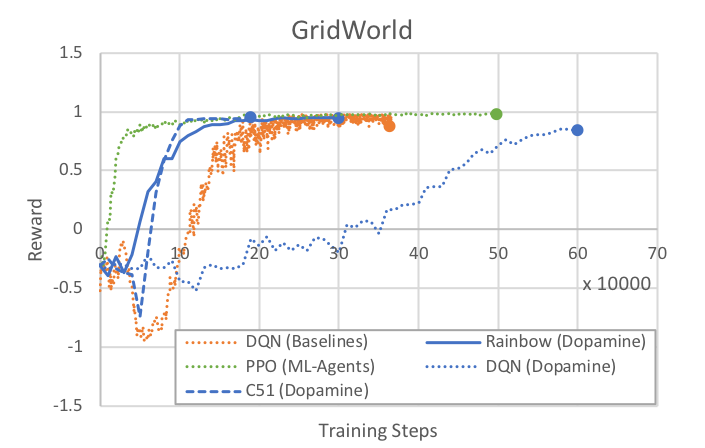
As a baseline, here are rewards over time for the three algorithms provided with Dopamine as run on the GridWorld example environment. All Dopamine (DQN, Rainbow, C51) runs were done with the same epsilon, epsilon decay, replay history, training steps, and buffer settings as specified above. Note that the first 20000 steps are used to pre-fill the training buffer, and no learning happens.
We provide results from our PPO implementation and the DQN from Baselines as reference. Note that all runs used the same greyscale GridWorld as Dopamine. For PPO, num_layers was set to 2, and all other hyperparameters are the default for GridWorld in config/ppo/GridWorld.yaml. For Baselines DQN, the provided hyperparameters in the previous section are used. Note that Baselines implements certain features (e.g. dueling-Q) that are not enabled in Dopamine DQN.