Scene Cache
Scene Cache is a feature to playback all frames of an .sc file that
was exported using MeshSyncDCCPlugins
installed in a DCC Tool.
This functionality is very similar to AlembicForUnity,
but it has the following differences:
- Scene Cache is designed to playback frames precisely with high performance.
- Scene Cache supports material export/import
- Unlike Alembic, .sc files are only playable in Unity.
How to use
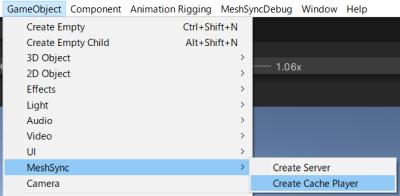
From the menu, select Game Object > MeshSync > Create Cache Player,
and then select the .sc file exported by the DCC tool.
This will automatically create a GameObject with
SceneCachePlayer component,
which will be played automatically in PlayMode.
Normally, the playback is controlled using an Animator with an AnimationClip, but we can also control the playback of Scene Cache in Timeline.
Scene Cache Player
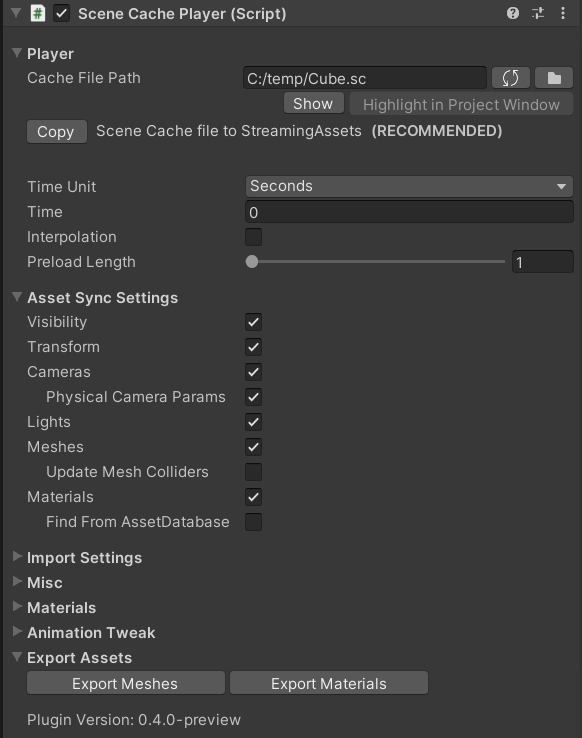
This component handles the playback. There are many settings which are in common with MeshSyncServer.
Cache File Path
Initially, the path to the .sc file is absolute, and therefore the animation can only be played on that PC.
Copying the cache file to StreamingAssets is recommended, and can be done by simply clicking the "Copy" button.
This will allow us to play the clips on the same project copied to another PC, or in a runtime executable.Time
This is the playback time. We can play the animation by moving this parameter. Usually this will be controlled by the AnimationClip.Interpolation
Smooths animations by interpolating meshes and transforms from previous and subsequent frames.
Mesh is only interpolated if the topologies match (the index remains unchanged).