Material Switch Clip
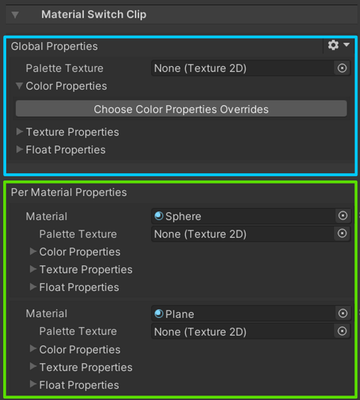
The inspector of MaterialSwitchClip is used to override material properties of objects in the Selection Groups bound to the track, and it contains two sections:
- The global properties section
To override the same properties of all materials related to the track with the same values. - The per material section
To override the material property of each material separately.
You can override the following material properties:
- Texture (Sprites and sprite textures are not supported.)
- Color
- Float
Operations
Override a material property
Click one of the "Choose Property Overrides" buttons, and select one of the properties in the dropdown menu, which lists all available properties automatically.
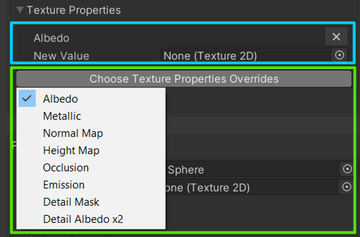
The selected material property will then appear in the inspector, and assigning a custom value to it will override the material property without changing the original value.
Remove a material property override
To remove a material property override, simply click on the X button at the top right of the property.

Copy and Paste Material properties.

The gears button at the top right of both sections contains items that can be used to copy the override values of the corresponding material properties and apply them to another material.