Shotgun Menu in Unity
After opening Unity from Shotgun Desktop, a new top level Shotgun menu item will appear.
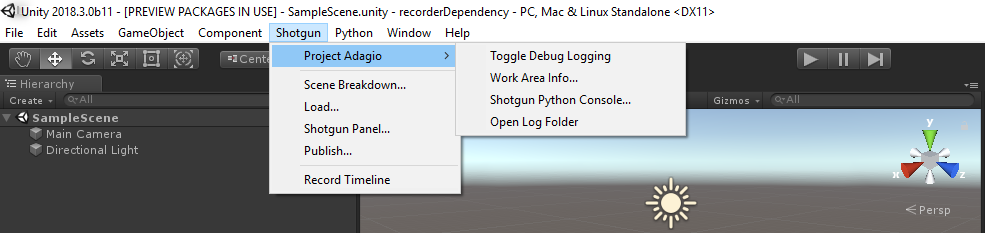
Top Level Menu Items
| Option | Description |
|---|---|
| Scene Breakdown... | Opens the Scene Breakdown app. |
| Load... | Opens the Shotgun Loader app. |
| Shotgun Panel... | Opens the Shotgun Panel, a lightweight version of Shotgun that allows you to quickly and easily access Shotgun information such as Notes, Tasks, Versions and Publishes in Unity. |
| Publish Recording... | Records the timeline and Opens the Shotgun Publish app. |
Project Specific Menu Items
| Option | Description |
|---|---|
| Toggle Debug Logging | If Debug Logging is enabled, the Shotgun integration will write debug messages to the Unity Console as well as a log file on disk. |
| Work Area Info... | Opens the Work Area Information app for the current project. It shows information on the current project, environment settings, and running toolkit apps. |
| Shotgun Python Console... | Opens the Shotgun Python Console, an interactive Python console that runs inside Unity. |
| Open Log Folder | Opens the folder containing the Shotgun log files. |
Note: Menu Items available will vary depending on your Pipeline Configuration