Input System
The Input System allows your users to control your game or app using a device, touch, or gestures.
Introduction
Unity supports input through two systems:
- The Input Manager, documented in the main Unity manual. This system is available for backward compatibility. For new projects, use the Input System.
- The Input System package described in this documentation. This is a more flexible system than the Input Manager and replaces it for new projects.
The Unity Editor 6.7 and newer installs the Input System package for projects created from some of the template. For empty projects and for older versions of the Editor, please install the package using the Package Manager.
Tip
During the installation process for the Input System package, the installer offers to automatically deactivate the older built-in system.
To get started, refer to the Workflows section to decide how to use the Input System:
- Using actions, which is the recommended workflow.
- Using both actions and the PlayerInput component, which provides features for callbacks and multiplayer.
- Directly read device states with a script for fast prototyping or single-platform applications.
For a demo project, refer to the Warriors demo on GitHub.
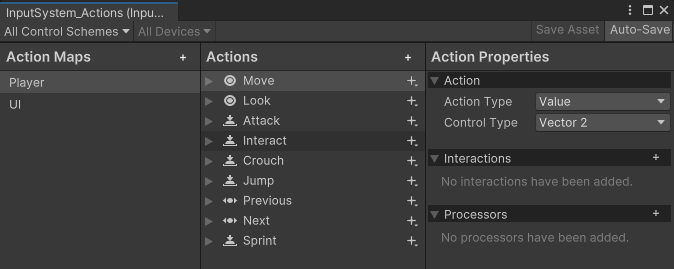
The Input Actions Editor, displaying several default actions from the Input System package.