Default interactions
Different Action types have different default Interactions. For example, the following diagram shows the behavior of the built-in Interactions for a simple button press.
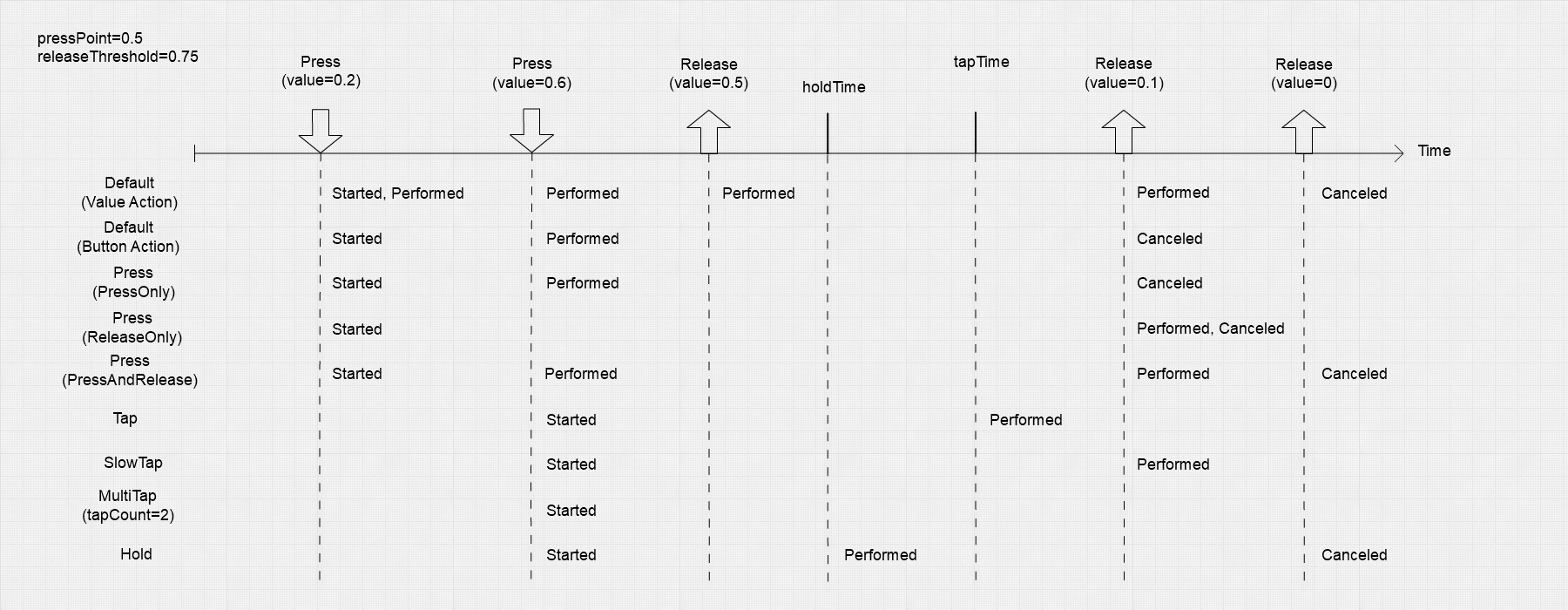
The following table provides an at-a-glance overview of how Interaction phases change for each action type's default Interaction.
| Callback | InputActionType.Value |
InputActionType.Button |
InputActionType.PassThrough |
|---|---|---|---|
started |
Control(s) changed value away from the default value. | Button started being pressed but has not necessarily crossed the press threshold yet. | not used |
performed |
Control(s) changed value. | Button was pressed to at least the button press threshold. | Control changed value. |
canceled |
Control(s) are no longer actuated. | Button was released. If the button was pressed above the press threshold, the button has now fallen to or below the release threshold. If the button was never fully pressed, the button is now back to completely unpressed. | Action is disabled. |
Value Action default Interaction
Value-type Actions have a default Interaction with the following behavior:
- As soon as a bound Control becomes actuated, the Action's Interaction phase goes from
WaitingtoStarted, and then immediately toPerformedand back toStarted. One callback occurs onInputAction.started, followed by one callback onInputAction.performed. - For as long as the bound Control remains actuated, the Action's Interaction phase stays in
Startedand triggersPerformedwhenever the value of the Control changes (that is, one call occurs toInputAction.performed). - When the bound Control stops being actuated, the Action's Interaction phase goes to
Canceledand then back toWaiting. One call occurs toInputAction.canceled.
Button Action default Interaction
Button-type Actions have a default Interaction with the following behavior:
- As soon as a bound Control becomes actuated, the Action's Interaction phase goes from
WaitingtoStarted. One callback occurs onInputAction.started. - If a Control then reaches or exceeds the button press threshold, the Action's Interaction phase goes from
StartedtoPerformed. One callback occurs onInputAction.performed. The default value of the button press threshold is defined in the input settings. However, an individual control can override this value. - Once the Action has
Performed, if all Controls then go back to a level of actuation at or below the release threshold, the Action's Interaction phase goes fromPerformedtoCanceled. One call occurs toInputAction.canceled. - If the Action's Interaction phase never went to
Performed, it will go toCanceledas soon as all Controls are released. One call occurs toInputAction.canceled.
PassThrough Action default Interaction
PassThrough-type Actions have a default Interaction with a simpler behavior. The Input System doesn't try to track bound Controls as a single source of input. Instead, it triggers a Performed callback for each value change.