About the Player Input component
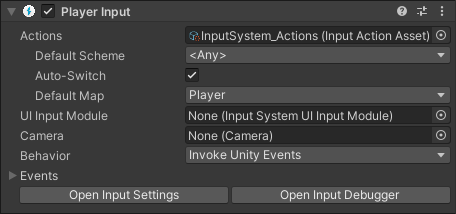
Above, the Player Input component displayed in the inspector.
Connecting actions to methods or callbacks
The Player Input component represents a single player, and the connection between that player's associated device, Actions, and methods or callbacks.
You can use a single instance of a Player Input component in a single-player game to set up a mapping between your Input Actions and methods or callbacks in the script that controls your player.
For example, by using the Player Input component, you can set up a mapping between actions such as "Jump" to C# methods in your script such as public void OnJump().
There are a few options for doing exactly how the Player Input component does this, such as using SendMessage, or Unity Events, which is described in more detail below.