Tips and troubleshooting
This section provides tips and troubleshooting for Forma Addressables.
Supported platforms
- Windows
- Mac
- Linux
- WebGL
- iOS
- Android
Unity Localization Package
Forma does not support the Unity Localization Package.
Build files
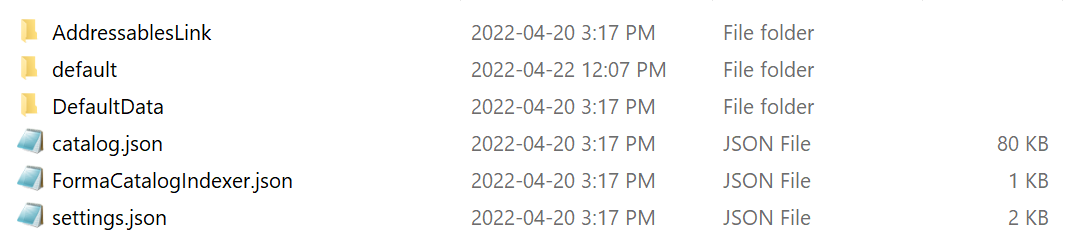
| File | Description | Notes |
|---|---|---|
AddressablesLink |
Used for code stripping by the addressable package | Not required at runtime |
default |
Contains your product builds and catalogs | You can move this folder to a remote server if needed |
DefaultData |
Contains the Default Local Group data and other users' addressable data | |
catalog.json |
Generated by the Addressable Assets system | Required at runtime and should always remain in your StreamingAssets folder |
settings.json |
Generated by the Addressable Assets system | Required at runtime and should always remain in your StreamingAssets folder |
FormaCatalogIndexer.json |
Contains the relative catalog path | Used on iOS, Android, and CCD instead of scanning the folder for the catalog path |
Common issues
My addressable assets stopped working
Delete the Library folder. If the problem persists, delete the AddressableAssetsData folder.
No products appear in the builds
Delete the Library folder. If the problem persists, delete the AddressableAssetsData folder.
I can't find the AddressableAssetsData Folder
If the folder is missing, Forma will automatically recreate it along with the product groups. If you need to manage your own addressable assets, synchronize the AddressableAssetsData folder with Git.
Note: This folder is only used by the editor and not at runtime.
I want to split products by catalog
By default, products are saved in the default catalog. To automatically split products into different catalogs, unzip the following files in the Assets folder: Forma4_SplitProductsByCatalogs.zip.
Products and builds
How do I check if products and sources are loaded?
Check the value of the following variable in your script:
var isAllSourceLoaded = Configurator.s_ConfiguratorInstance.settings.ProductSources.All(p => p.IsLoaded);
What is a MixedProductSource?
MixedProductSource is the default variation of the ProductSource component. It uses the AssetDatabase and the AddressableAssets folders and can automatically load all products from the local StreamingAssets folder.
Where do my builds save when using publishers?
If you enable a Forma build publisher, the addressable build will save in the ServerData folder and will not be in the application build. Without a Forma build publisher, the addressable build will save in the StreamingAssets folder and will be part of the application build.
Note: This process is automatically managed by Forma.
How do I update products during the build process?
In Forma 3.0.2+, use the IFormaBuildCallbackReceiver script to receive pre- and post-build events:
void OnEarlyPreBuildProcess(BuildProfile buildProfile);
void OnPreBuildProcess(BuildProfile buildProfile);
void OnPreAddressableBuildProcess(AddressableAssetSettings settings, BuildProfile buildProfile, ref List<AnalyzeRule> aaRulesToRun);
void OnPreAddressableProductCatalogBuildProcess(AddressableAssetSettings settings, BuildProfile buildProfile, ref ExportableProductCatalog productCatalog, ref CatalogMetadata catalogMetadata);
void OnPostAddressableProductCatalogBuildProcess(AddressableAssetSettings settings, BuildProfile buildProfile, ExportableProductCatalog productCatalog, CatalogMetadata catalogMetadata);
void OnPreAddressableDefaultDataCatalogBuildProcess(AddressableAssetSettings settings, BuildProfile buildProfile, ref CatalogMetadata catalogMetadata);
void OnPostAddressableDefaultDataCatalogBuildProcess(AddressableAssetSettings settings, BuildProfile buildProfile, CatalogMetadata catalogMetadata);
void OnPostAddressableBuildProcess(AddressableAssetSettings settings, BuildProfile buildProfile);
void OnPostBuildProcess(BuildProfile buildProfile, BuildReport buildReport);
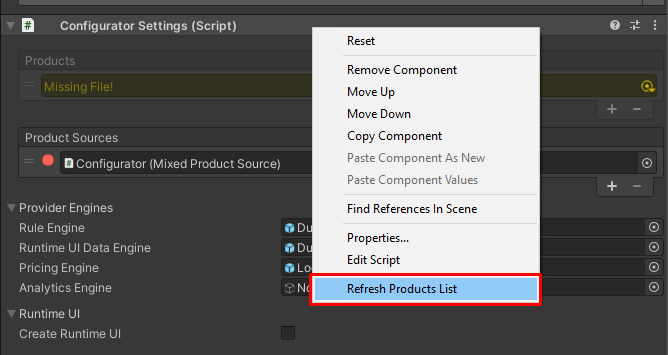
I'm missing a product entry
In the Forma Editor, select Configurator Settings > Refresh Products List.
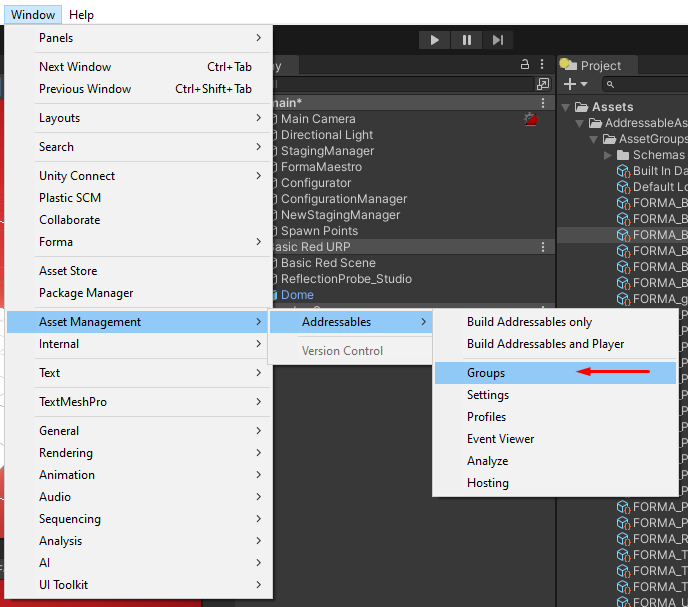
How do I load specific products at runtime?
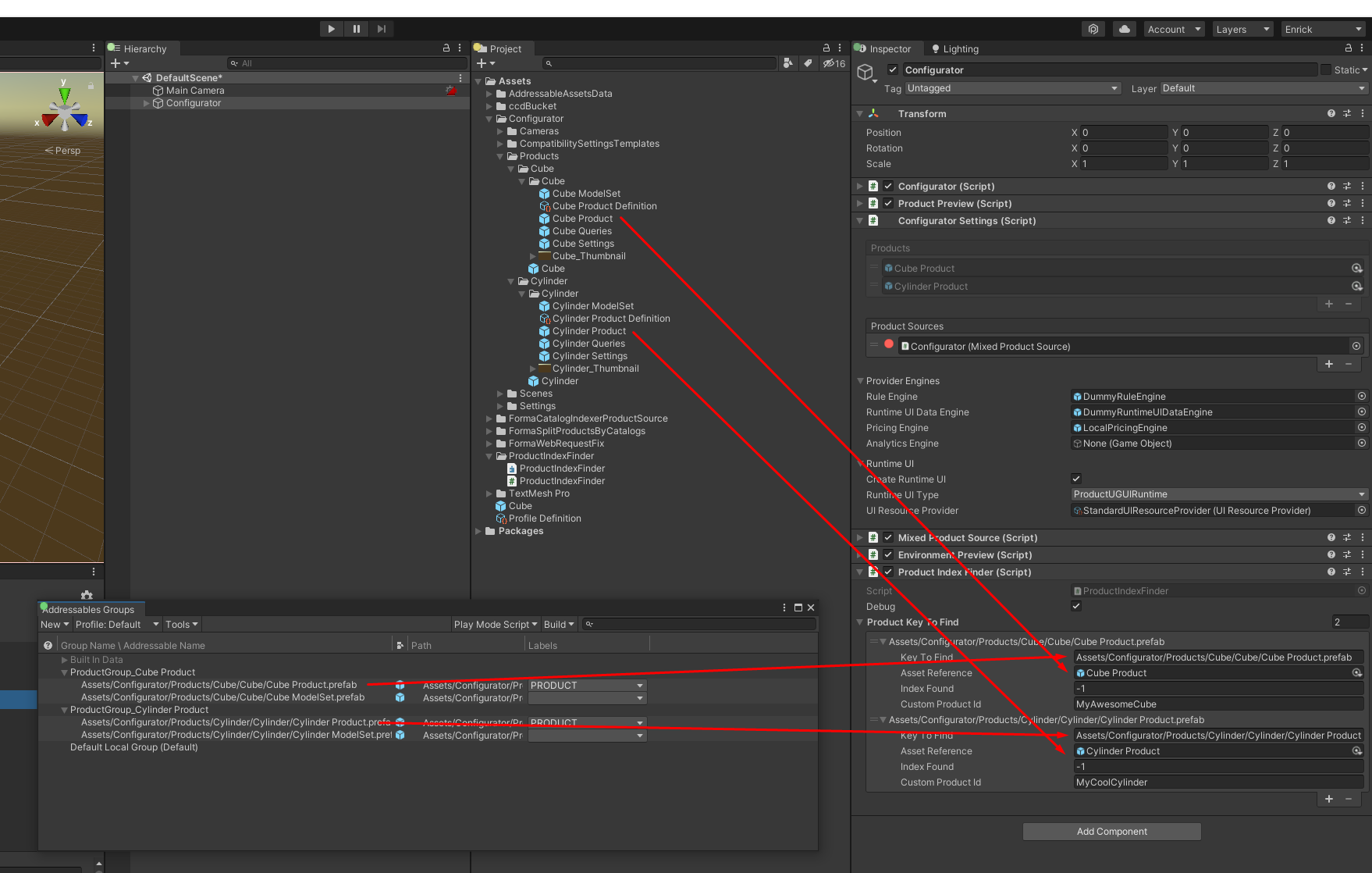
To load specific products, follow these steps:
- In the Assets folder, unzip Forma4_ProductIndexFinder.zip.
- Add the FormaProductIndexFinder component to the Configurator.
- Assign a prefab asset and its address key to each field.
How do I only create a product build?
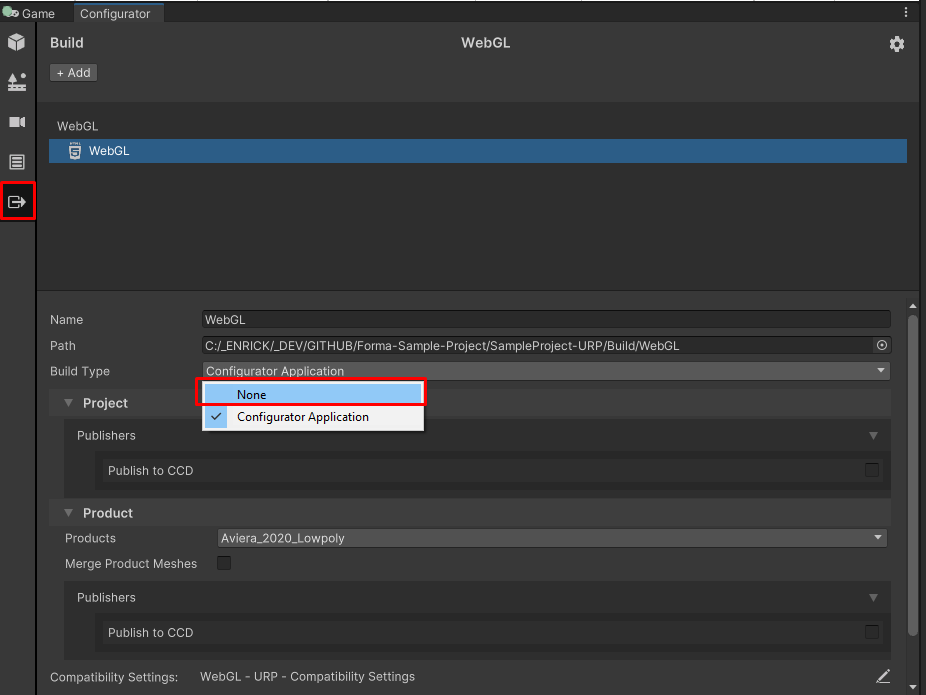
To skip the build player step while building the addressable content, select None as the product build type. This can be useful when producing and exporting content for an existing player.
How do I test existing builds in the editor during Play mode?
When you enter Play mode, Forma 4.0.0+ will adapt to the selected Play mode script.

Materials and APIs
Some materials are showing up pink
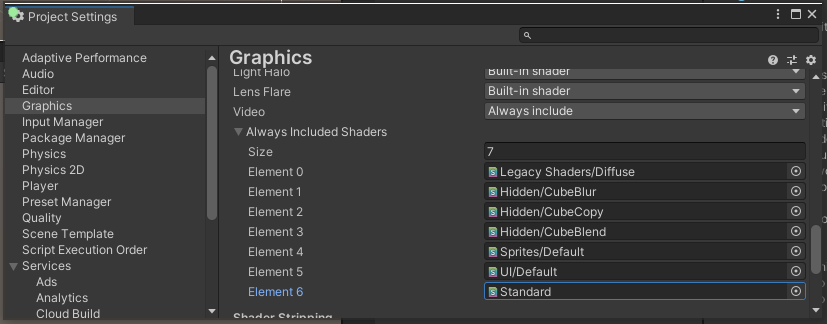
When compiling a build, Unity only includes required shaders, such as shaders assigned to a material in the scene. To switch a shader at runtime, go to Edit > Project Settings > Graphics and add your missing shader to the list under Always Included Shaders.
I'm missing materials
In Graphic Settings, make sure that the list under Always Included Shaders stays the same between building and loading the AssetBundle. If you remove a shader, it might not be included in your built player or appear in AssetBundle.
I'm missing an API
In the target platform's Player Settings, make sure that the Graphic APIs list stays the same and contains all needed APIs between building and loading the AssetBundle. If you remove an API, the shader code built into the AssetBundle could be for the wrong API, resulting in the shader being unsupported on the target platform.
Paths
The addressable Local.BuildPath or Local.LoadPath is not updating
This issue is fixed in Forma 4.0.0 and above.
My Remote Catalog path isn't working
Make sure to include at least two subfolders in the catalog URL. The first subfolder can be your own or the platform subfolder. The second one should be that original catalog name.
For example, https://something.com/WebGL/default/catalog_xxxxxxxxxxxx.json.
Errors
Schema NullReferenceException on build
Delete the AddressableAssetsData folder and try again.
Invalid URI: The hostname could not be parsed
There are multiple possible causes for this error:
- Your cataglog path uses "\" instead of "/"
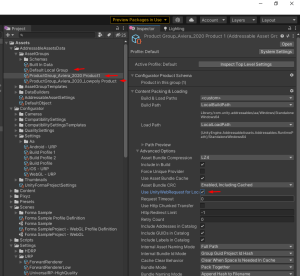
UseUnityWebRequestForLocalAssetBundlesisfalse
If you're using Forma 3.0.0 and below with Addressable 1.18.12 and above, you need to check this manually. This is fixed in Forma 4.0.0 and above.
Miscellaneous
Instancing variants
- Keep all: keeps all variants
- Strip all: strips all variants
- Strip unused: strips all unused variants
Multi-project best practices
- Use the same version for the Unity player and for the Forma and Addressable Assets package
- Build Addressable Assets targeting the same platform
- Don't load new scripts and shaders from another project into the Unity player
Unity Blog Reference