Entities Memory Profiler module reference
The Entities Memory Profiler module displays how much memory the archetypes in your project use in each frame. You can investigate the data on a per-frame basis, which is helpful to identify where any memory spikes happened, and what archetypes contributed to performance-intensive actions.
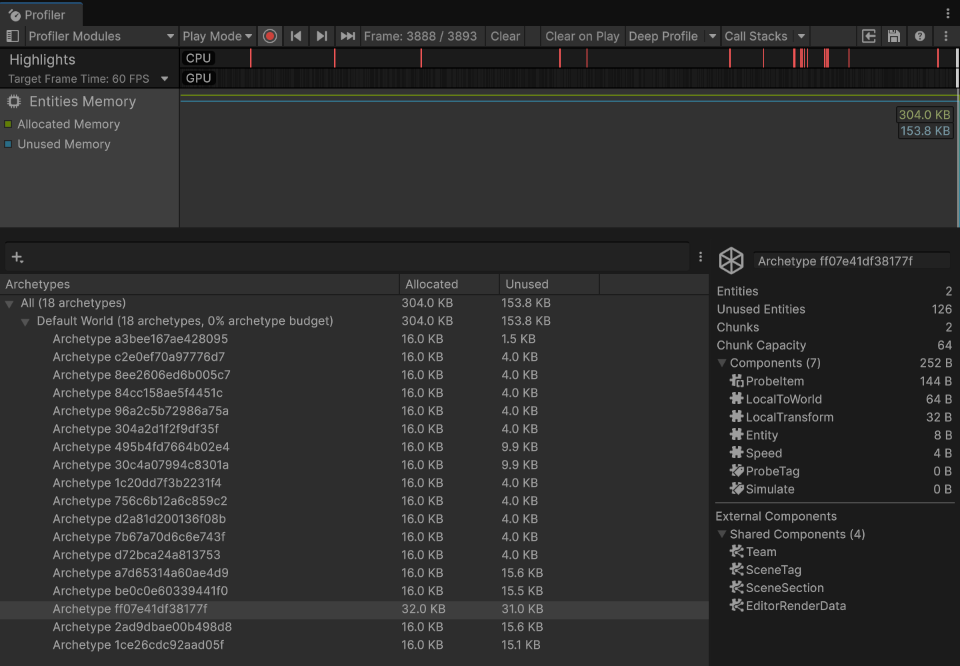
The Profiler window displays the Entities Memory module and the details of the selected archetype
Chart categories
The Entities Memory Profiler module displays two charts: Allocated Memory and Unused Memory, which displays the amount of allocated and unused memory in MB on a per-frame basis.
Module details pane
When you select the module, the details pane at the bottom of the Profiler window displays further information about the archetypes that used memory during the capture. The archetypes are listed by World, with the amount of allocated and unused memory displayed.
Each world row also displays the number of archetypes that the list contains for the world, and the percentage of the world's archetype budget or query budget that the world uses, whichever is higher. For example, Default World (18 archetypes, 0% archetype budget). For more information about the budgets, refer to Archetype and query memory budgets.
Archetype information
When you select an archetype, the pane displays the following information:
| Property | Description |
|---|---|
| Archetype hash | Displays the name of the archetype, which is its hash. Use the hash to find the archetype again in future Unity sessions, for example with the search field. |
| Entities | Displays the number of entities in the archetype. |
| Unused Entities | Displays the number of additional entities that fit in the chunks that the archetype already uses. This number is equal to Chunks multiplied by Chunk Capacity, minus Entities. |
| Chunks | Displays the number of chunks that the archetype uses. |
| Chunk Capacity | Displays the number of entities of the archetype that fit in one chunk. |
| Components | Displays the number of components in the archetype and the memory that the components of one entity use in a chunk. To display each component and the memory that it uses for one entity, expand this section. |
| External Components | Contains the chunk components and shared components of the archetype. Unity stores the data of these components outside the memory that the Components section displays. This section is available only when the archetype has chunk components or shared components. |
World information
When you select a world row, the pane displays the following information:
| Property | Description |
|---|---|
| Archetype Budget | Displays the percentage of the world's archetype budget that the world uses. |
| Capacity (under Archetype Budget) | Displays the memory that the world uses for archetype data, and the size of its archetype budget. For example, 64.0 KB / 16.0 MB. |
| Query Budget | Displays the percentage of the world's query budget that the world uses. |
| Capacity (under Query Budget) | Displays the memory that the world uses for entity query data, and the size of its query budget. |
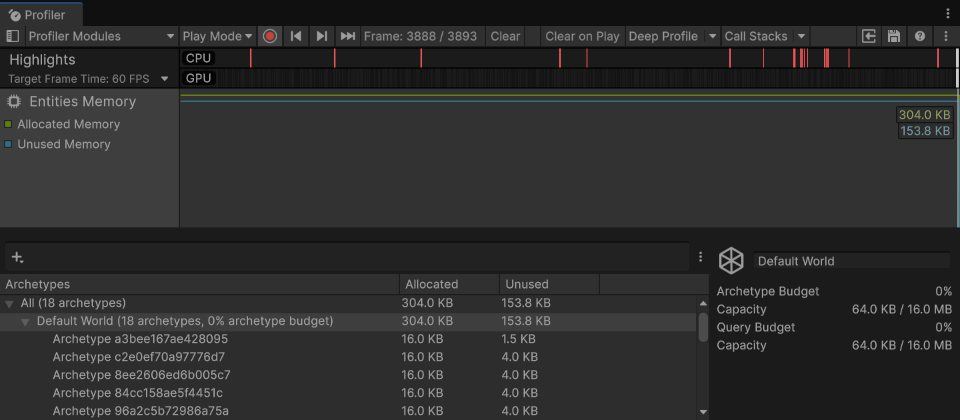
The Entities Memory module with a world row selected
Search for archetypes
The search field at the top of the details pane filters the list of archetypes. Text that you type matches the names of the component types in each archetype, and the archetype names. You can also use the following filters:
| Filter | Result |
|---|---|
t:Speed |
Archetypes that have a component type whose name contains Speed. The filter isn't case-sensitive. |
t=Speed |
Archetypes that have a component type whose name is Speed. |
w:Default |
Archetypes in the worlds whose names contain Default. |
entities>100 |
Archetypes that have more than 100 entities. You can also use unusedEntities, chunks, and components to filter by the matching properties of the archetype. |
allocated>16384 |
Archetypes that allocated more than 16384 bytes of chunk memory. Use unused to filter by unused chunk memory. |
Use the short name of a component type, for example t:LocalTransform. Full type names, such as Unity.Transforms.LocalTransform, don't match. You can combine several filters and text in the same search.
Show empty archetypes
By default, the list hides the archetypes that have no entities, and the number of archetypes in each world row doesn't include them. To display them, select the More menu (⋮) at the right of the search field, and then select Show Empty Archetypes. Empty archetypes use memory from the archetype budget of their world, so it's useful to display them when you investigate why a world reaches the limit of its archetype budget.