A system reads stale transform data
This scenario demonstrates a common problem with reading a position, and how to use the Systems window to identify and fix it. A system reads transform data from LocalToWorld and gets the previous frame's value, instead of the current one.
Symptoms
A system in your project reads the world-space position of moving entities. The values it reads seem wrong or one frame behind. An example of such a system:
public partial struct AnchorPositionSystem : ISystem
{
    public void OnUpdate(ref SystemState state)
    {
        foreach (var localToWorld in
            SystemAPI.Query<RefRO<LocalToWorld>>())
        {
            // If TransformSystemGroup hasn't updated yet,
            // this is the previous frame's position
            float3 worldPos = localToWorld.ValueRO.Position;
            // ... use worldPos for calculations
        }
    }
}
Cause
The system doesn't declare its update order explicitly, or the declared order is wrong.
Unity calculates the LocalToWorld data in LocalToWorldSystem, which updates inside the TransformSystemGroup. A system that doesn't declare a group updates in the SimulationSystemGroup, and so does TransformSystemGroup. The system in this example doesn't declare an execution order relative to TransformSystemGroup, so Unity chooses one. Unity might place your system before or after the transform systems. If your system runs first, it reads the LocalToWorld values that Unity calculated on the previous frame.
Diagnosis
To check whether the issue is caused by the incorrect execution order:
Open the Systems window: select Window > Entities > Systems.
Expand the Simulation System Group and find your system and Transform System Group. Systems higher in the list update first.
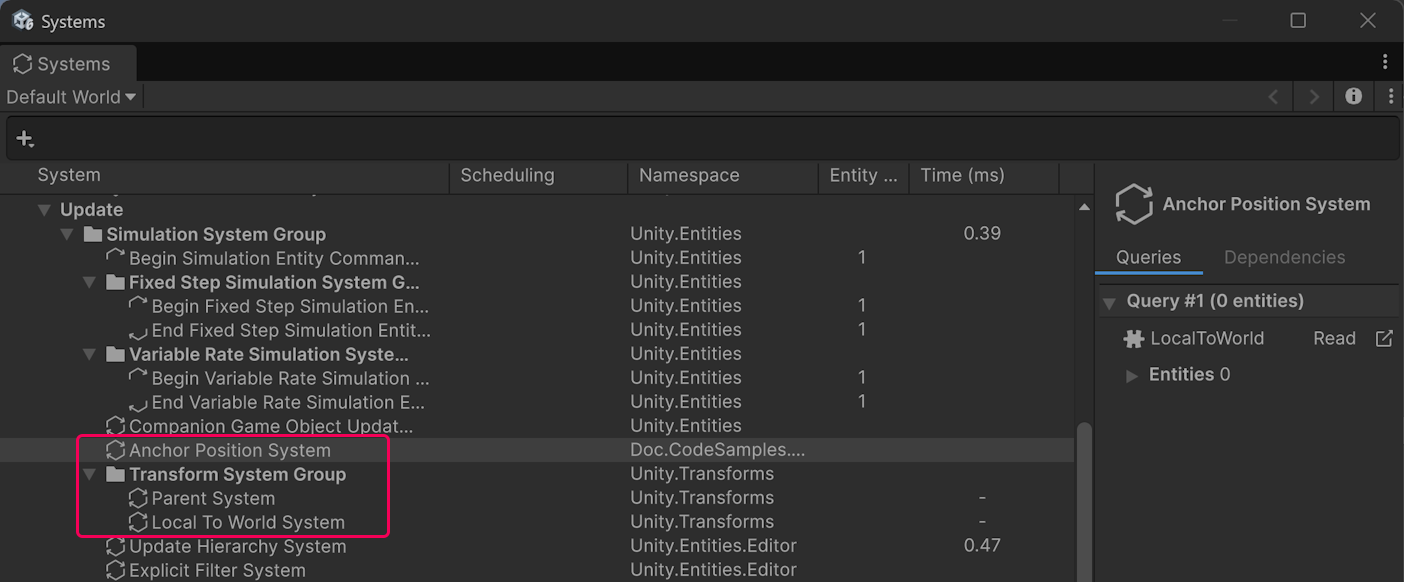
If your system appears above Transform System Group, it reads the previous frame's values.
Select your system and check the Scheduling column. If no label appears next to Transform System Group, then your system doesn't set an order explicitly, and the position you see is the one Unity chose.
Note
Without an explicit order attribute, Unity might place your system below Transform System Group, but it's not guaranteed to remain there. Renaming your system, moving it to another namespace, or adding an unrelated system to the same group can move it above the transform systems.
Resolution
The example system only reads transform data, so it can update after the transform systems. Add the UpdateAfter attribute to it:
[UpdateAfter(typeof(TransformSystemGroup))]
public partial struct AnchorPositionSystemFixed : ISystem
{
    public void OnUpdate(ref SystemState state)
    {
        foreach (var localToWorld in
            SystemAPI.Query<RefRO<LocalToWorld>>())
        {
            // TransformSystemGroup has updated at this point,
            // so this is this frame's current position
            float3 worldPos = localToWorld.ValueRO.Position;
            // ... use worldPos for calculations
        }
    }
}
To check the fix, open the Systems window again.
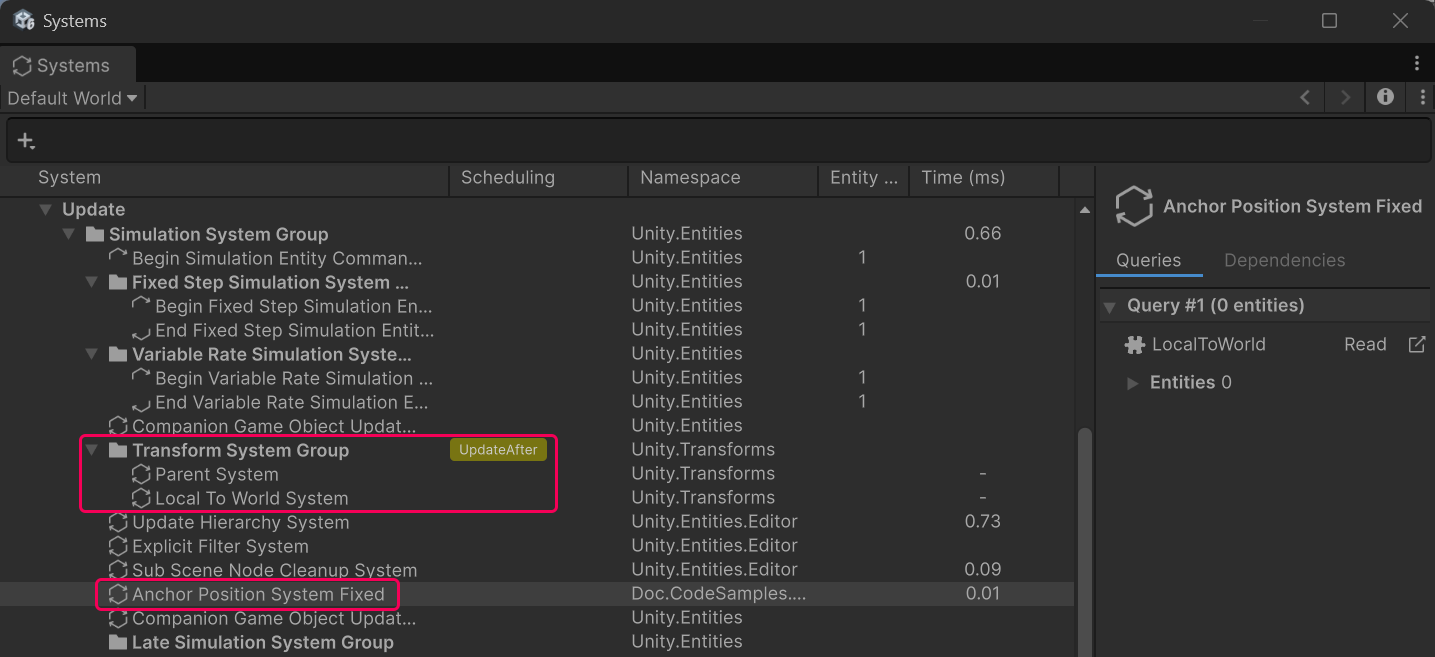
The system now appears below Transform System Group, and the Scheduling column displays an UpdateAfter label next to Transform System Group when the system is selected.
After Transform System Group updates, LocalToWorld reflects this frame's transforms, unless a later system modifies them. It can also contain offsets that Unity applies for graphical smoothing. If you need an exact world transform for simulation purposes rather than a fast approximation, use TransformHelpers.ComputeWorldTransformMatrix. For more information, refer to Transform concepts.
Note
Don't use this solution for a system that writes LocalTransform. Such a system has to keep updating before Transform System Group, otherwise the transforms it writes don't reach LocalToWorld until the next frame. To read an exact world position from such a system, use ComputeWorldTransformMatrix. For more information, refer to Transform helper overview.