Installation
This section outlines how to install Unity Cloud Storage in your Unity project.
Before you install the package, make sure you meet the prerequisites.
Prerequisites
To use the package, you require the following:
- A Unity version of 2021.3 or later
- A Unity account (required to generate an identifier for your application)
- A new or existing Unity project
Install the Unity Cloud Storage package from the Unity Package Manager
Important: Unity Cloud SDKs are categorized as Experimental Packages. Before you can successfully install them from the Unity Package Manager, you must enable Experimental Packages from the Editor. See: Experimental packages
To install the Unity Cloud Storage package, follow these steps:
- In your Unity project, go to Windows > Package Manager.
- On the status bar, select the Add (+) button.
- From the Add menu, select Add + package by name. Name and Version fields appear.
- In the Name field, enter the name of the package you want to install.
Example: com.unity.cloud.[packageName] - Select Add.
The Editor installs the latest available version of the package and any dependent packages.
Additional resources
Build settings
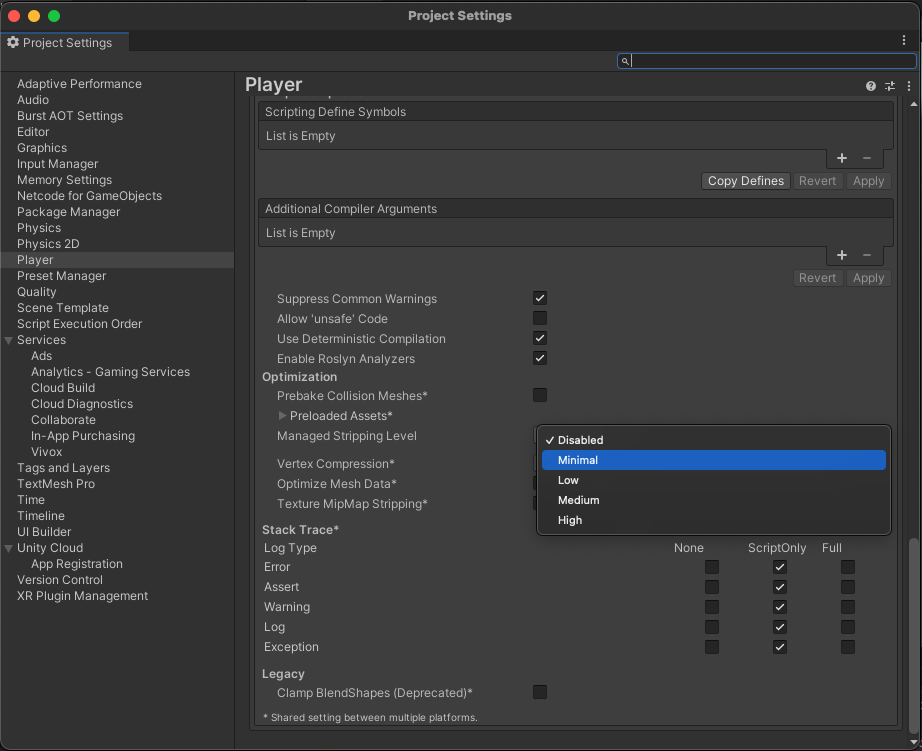
On certain platforms such as WebGL, code stripping levels can cause certain runtime errors to occur.
When making builds that include this package, the Managed Stripping Level should be set to "Disabled" if the option is available for the chosen platform, else set to "Minimal".