Troubleshooting
This section describes errors or problems you can encounter when you use the Unity Cloud Metadata package.
General issues
I can't access a resource
If you can't access a specific resource, make sure you:
- Are logged in with your Unity ID
- Access to the Asset Management Dashboard to access the resource you want to open
Getting started issues
Runtime errors appeared when building the package
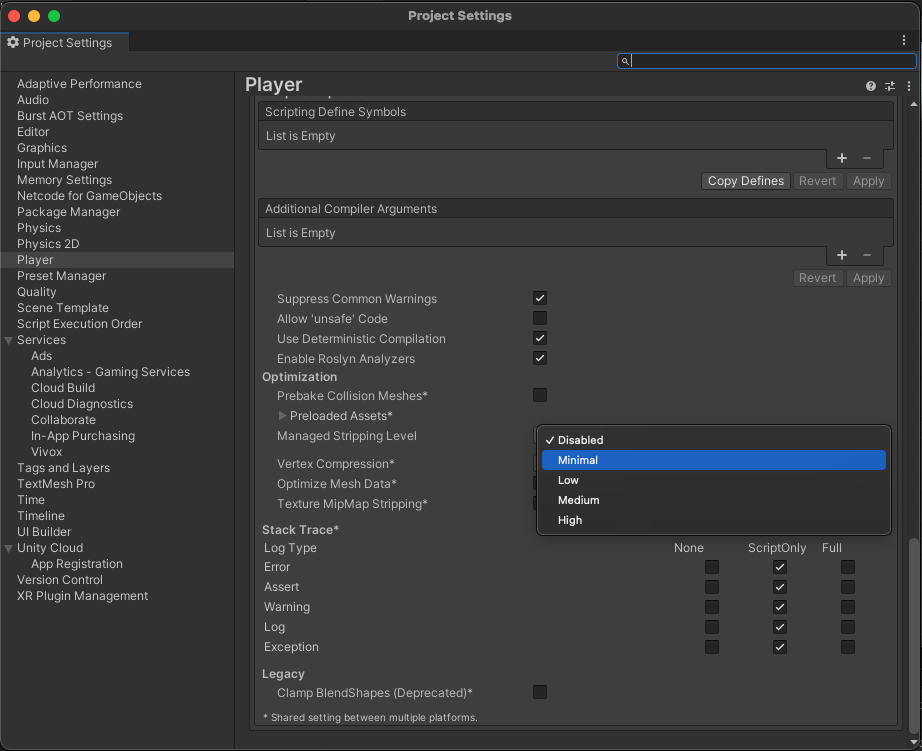
To avoid runtime errors when building with this package, follow these steps:
- In your Unity Editor Project window, go to Edit > Project settings.
The Project setting window opens. - Select the Player option.
- Scroll to the Additional Compiler Arguments section.
- Set the Managed stripping level option to:
- Disabled
or - Minimal (if the Disabled option isn't available)
Sample issues
Object Picking sample issues
I can't see any models when my dataset runs
To use the Data Streaming package, your Project must use either the High Definition Render Pipeline (HDRP) or the Universal Render Pipeline (URP).
I only see the object id in the BIM Metadata window
When you select an object in your dataset and the BIM Metadata window is only showing the object id, this means that no metadata is attached to this object in your original file.
Query Builder sample issues
I have no metadata attached to my scene
If there's no metadata attached to your dataset, it could be because the file did not contain any metadata.