docs.unity3d.com
    Show / Hide Table of Contents

    Events API

    Note
    To use Bolt, which is Unity's visual scripting solution, download it from the Unity Asset Store.

    Bolt provides a simple API to trigger custom events from script.

    Usings

    Make sure you add the following usings to your C# script to access the API:

    using Ludiq;
    using Bolt;
    

    Triggering

    A single method call is needed to trigger a custom event:

    CustomEvent.Trigger(targetGameObject, argument1, argument2, ...)
    

    You can pass as many arguments as you need (or no event at all).

    For example, this custom event unit:
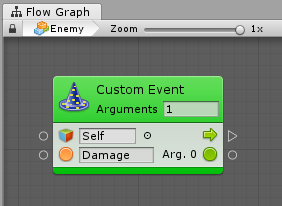
    Can be triggered with this line of code:

    CustomEvent.Trigger(enemy, "Damage", 30);
    
    Back to top
    Terms of use
    Copyright © 2023 Unity Technologies — Terms of use
    • Legal
    • Privacy Policy
    • Cookies
    • Do Not Sell or Share My Personal Information
    • Your Privacy Choices (Cookie Settings)
    "Unity", Unity logos, and other Unity trademarks are trademarks or registered trademarks of Unity Technologies or its affiliates in the U.S. and elsewhere (more info here). Other names or brands are trademarks of their respective owners.
    Generated by DocFX on 18 October 2023