Prefabs
| Note |
|---|
| To use Bolt, which is Unity's visual scripting solution, download it from the Unity Asset Store. |
Prefab Support
| Prefab Instance | Macro | Embed |
|---|---|---|
| Created in editor |  |
 |
| Instantiated at runtime | |
|
As this table indicates, there is full prefab support for every type of graph except for embed graph prefab instances created in the editor.
If you use a machine with an embed graph as a prefab, the edits you make on the prefab definition will not be automatically propagated to the prefab instances. Bolt will display warning messages in the inspector and in the graph window when you try to do this:
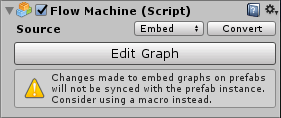
To avoid this, just remember this the rule of thumb:
When adding a machine to a prefab, use a macro instead of an embed.
Prefab Overrides
Bolt uses a custom serialization engine, FullSerializer, instead of Unity's default serialization. This is necessary because Unity's serialization is extremely limited in terms of nesting, extensibility and coverage. For this reason, prefabs are handled a little differently.
One minor consequence of this you might notice in prefabs is that when bolding inspector labels and values, it indicates differentiation rather than override. For example, an inspector field on a prefab instance will be never be bolded if it has the same value as the prefab definition, even if it has overridden this value.