Node, graph, and agent lifecycle overview
Unity Behavior uses three nested lifecycle layers that work together during runtime:
BehaviorGraphAgentlifecycle on a GameObjectBehaviorGraphruntime instance lifecycleNodecallback lifecycle within each graph module
Each layer has a specific role in creating, running, and cleaning up behavior logic.
Runtime lifecycle at a glance
At runtime, Unity initializes and runs behavior graphs through a sequence of lifecycle stages across the agent, graph, and nodes.
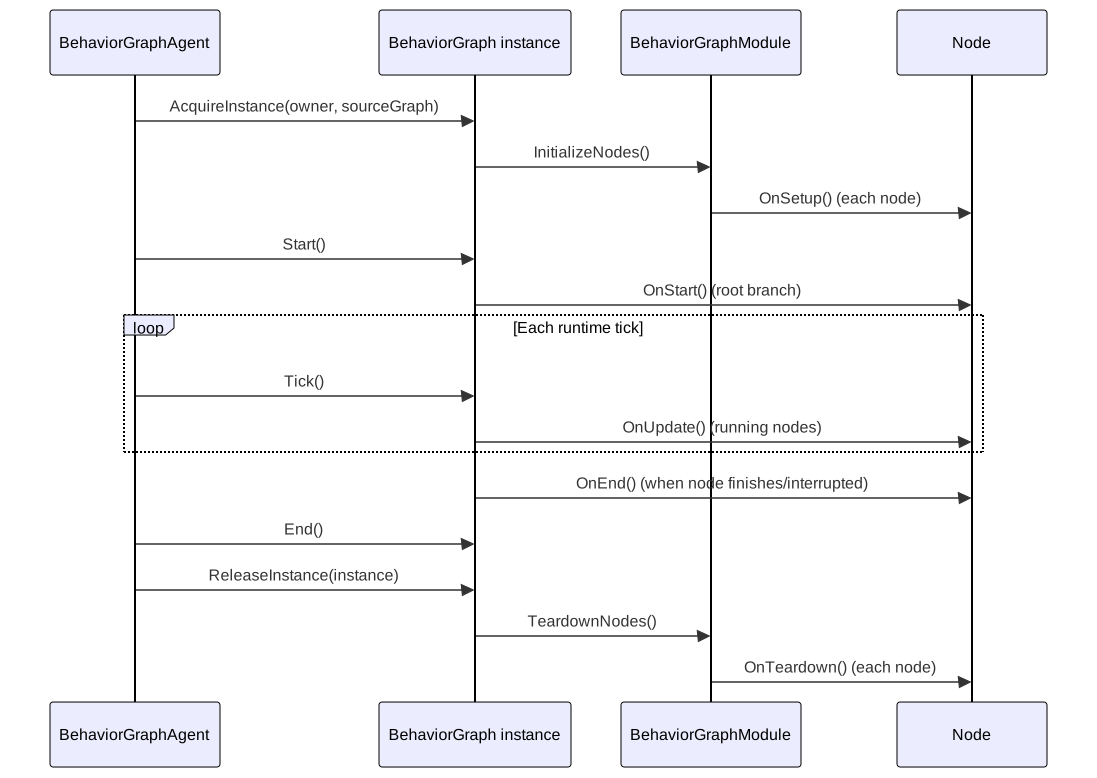
Node lifecycle callbacks
Nodes use lifecycle callbacks to define behavior at different stages of implementation. Each callback runs at a specific time and serves a distinct purpose.
Use node callbacks by intent as shown in the following table:
| Callback | When it runs | Typical usage |
|---|---|---|
OnSetup() |
Once per runtime graph instance initialization | Cache references and prepare one-time runtime data |
OnStart() |
Each time node starts | Enter the running state and start operations |
OnUpdate() |
Every tick while node is running | Evaluate or progress ongoing logic |
OnEnd() |
Each time the node stops | Stop active logic for that run |
OnTeardown() |
Once when the runtime graph instance is released | Unregister persistent callbacks and release setup-time resources |
OnSerialize() |
Before runtime graph serialization | Store runtime state required for restore |
OnDeserialize() |
After runtime graph deserialization | Restore runtime state and resume waiting work |
OnSetup() and OnTeardown() form a pair. Use them to manage resources that persist for the lifetime of the runtime graph instance.
BehaviorGraph runtime lifecycle
The BehaviorGraph defines how Behavior creates, runs, and releases a runtime graph instance.
| API | Behavior |
|---|---|
AcquireInstance(owner, sourceGraph) (internal) |
Clones the source graph and initializes modules and nodes (OnSetup). |
Start() |
Starts root node execution and registers shared blackboard variable runtime callbacks. |
Tick() |
Advances the graph by one step. |
End() |
Stops root execution, resets module runtime state, and unregisters shared variable runtime callbacks. |
ReleaseInstance(instance) (internal) |
Calls End(), then tears down modules and nodes (OnTeardown). |
BehaviorGraphAgent lifecycle responsibilities
At runtime, BehaviorGraphAgent owns the graph instance:
- Acquires a runtime graph instance from the assigned source graph.
- Starts and updates the graph while the component is active.
- Stops and releases the instance when the graph is replaced or the component is destroyed.
Subgraph lifecycle
RunSubgraphDynamic follows the same pattern:
- Acquire subgraph runtime instance on demand.
- Start and stop it with node execution
- Reacquire if the source subgraph reference changes.
- Release it during node teardown.
This keeps nested subgraph instances reusable during execution while still guaranteeing cleanup when the parent graph instance is released.
Static subgraphs (RunSubgraph) are baked into the parent graph at build time as additional BehaviorGraphModule instances, so they share the parent's full lifecycle with no special runtime management.