Assistant interface
This section provides a detailed tour of Assistant.
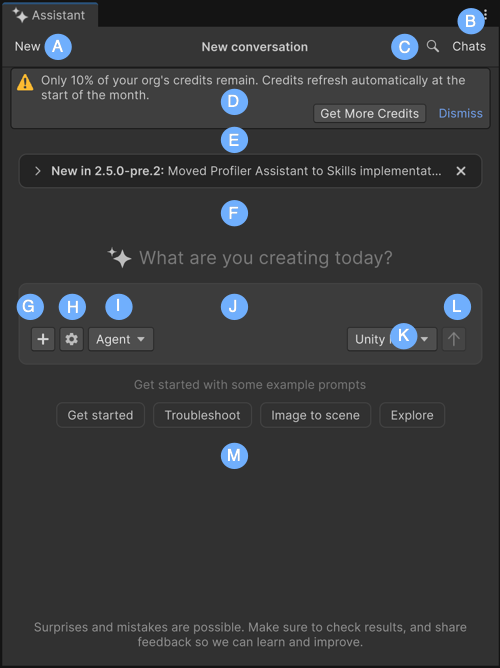
| Component | Description |
|---|---|
| A: New | Start a new conversation with Assistant or reset the current chat context. |
| B: Chats | Review and reuse previous information without having to retype or recall past conversations. |
| C: Search (magnifying glass) | Search across the current Assistant conversation to quickly find previous prompts and responses. |
| D: Low credits banner | Display the remaining balance. It appears when your organization is running low on usage credits. Select the link in the banner to request a credits top-up or Dismiss to hide the banner temporarily. |
| E: See what’s new | Read the latest updates and release highlights for Assistant. |
| F: Conversation area | Displays your prompts, Assistant responses, Reasoning section, and tool results. |
| G: Attach (+) | Attach supported project data to your prompt. For example, GameObjects, assets, scripts, Console messages, screenshots, and other supported project data. |
| H: Settings menu (gear icon) | Open the prompt settings menu, where you can enable Autorun, enable or disable Collapse Reasoning when complete, view Permission Overrides, open Assistant Settings, or refresh the project overview. |
| I: Mode selector (Ask/Plan/Agent) | |
| J: Text field | Enter your prompt. A prompt is the primary way to interact with Assistant. By typing in questions, instructions, or topics of interest, you start the conversation and receive relevant responses from Assistant. |
| K: Agent selector | Select the active provider or coding agent for the current conversation. When you enable AI Gateway, this menu lists Unity and any configured third-party agents, such as Claude Code, Codex, Gemini, or Cursor. Assistant routes your prompts to the selected agent. |
| L: Submit (arrow) | Send your prompts to Assistant. |
| M: Example prompt buttons | Quickstart suggestions (such as Get started, Troubleshoot, Image to scene, and Explore) that appear on the Assistant window. Select any button to populate your query with a suggested prompt and start your conversation with Assistant. |