Checkpoints reference
Explore the checkpoints-related properties and settings in Assistant.
Checkpoints settings
You can view and manage checkpoints in Preferences > AI > Assistant.
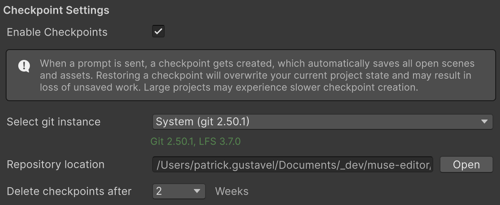
| Settings | Description |
|---|---|
| Enable Checkpoints | Turns checkpoint creation on or off for Assistant. When enabled, Assistant automatically creates Git snapshots of your project each time you send a prompt. This allows you to restore your project to an earlier state. When disabled, Unity doesn’t create checkpoints before Assistant prompts. |
| Select git instance | Displays the Git installation that Unity uses to store temporary checkpoints data. The available options include System (a Git version installed at the operating system level) and Custom (lets you specify a path to a different Git installation). |
| Repository location | Shows where Unity stores the local repository used for checkpoints. Unity stores this repository outside your project files on your local machine. |
| Delete checkpoints after | Controls how long Unity keeps the checkpoint commits before it deletes them automatically. The available options include 1 week or 2 weeks. |
These settings help limit disk usage and ensure checkpoints remain a short-term recovery feature rather than a long-term source control system.