Addressables Analyze window reference
Use the Addressables Analyze window to analyze the layout of the Addressables assets in your project. To open the window go to Window > Asset Management > Addressables > Analyze.
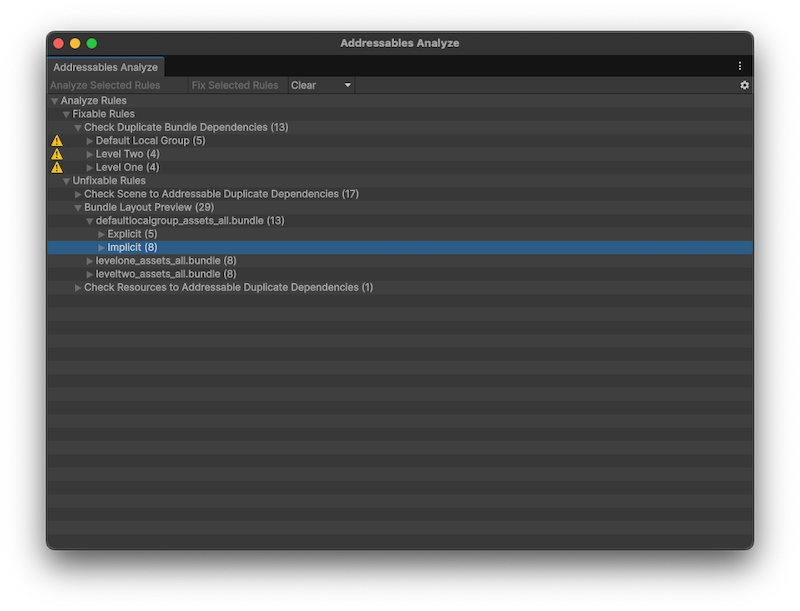 The Addressables Analyze window with some data loaded.
Toolbar
| Operation | Description |
|---|---|
| Analyze Selected Rules | Starts the analysis for any selected rules or their children. |
| Fix Selected Rules | Performs the fix action for any selected rules or their children (must be an Auto Fix rule). |
| Clear | Opens the clear options to clear the results for any selected rules or their children. |
| Options (gear icon) | Opens the options to import a saved analysis result or export results to disk. |
Auto Fix rules
Auto Fix rules are rules that Unity can automatically fix with the Fix Selected Rules operation.
| Rule | Description |
|---|---|
| Check Duplicate Bundle Dependencies | Checks for duplicated assets by scanning all groups with BundledAssetGroupSchemas and projecting the asset group layout. This requires triggering a full build, so this check is time-consuming and performance-intensive. |
Manual Fix Required rules
Manual Fix Required rules are those that are informational and have no appropriate action for Unity to fix them automatically. Resolve the reported issues yourself.
| Rule | Description |
|---|---|
| Check Scene to Addressable Duplicate Dependencies | Detects any assets or asset dependencies that are shared between the scenes in the Editor Scene list and Addressables. These duplicates mean that data is included in both the application build and the Addressables build. |
| Bundle Layout Preview | Displays how assets explicitly marked as Addressable are laid out in the Addressable build. Given these explicit assets, the window also displays what assets are implicitly referenced by, and therefore will be pulled into, the build. |
| Check Resources to Addressable Duplicate Dependencies | Detects if any assets or asset dependencies are duplicated between built Addressable data and assets residing in a Resources folder. These duplicates mean that data is included in both the application build and the Addressables build. One possible way to fix this issue is to move the assets out of the Resources folder and make them Addressable. |