Add a collider to a sprite shape
Add an Edge Collider 2D or Polygon Collider 2D component to a sprite shape so that other physics objects collide with it. Sprite shapes don't support other collider components.
To use the 2D Physics Core package instead, add a Physics Area Sprite Shape component. For more information, refer to Add physics areas to sprite shapes.
Add a collider
To add a collider to a sprite shape, follow these steps:
- Select a GameObject with a Sprite Shape Controller component in the Hierarchy window.
- In the Inspector window, select Add Component > Physics 2D, then select Edge Collider 2D or Polygon Collider 2D.
When the sprite shape has one of these components, the Collision section appears in the Sprite Shape Controller component. When you edit the sprite shape, Unity updates the collider to match its shape. For more information about the Collision settings, refer to Sprite Shape Controller.
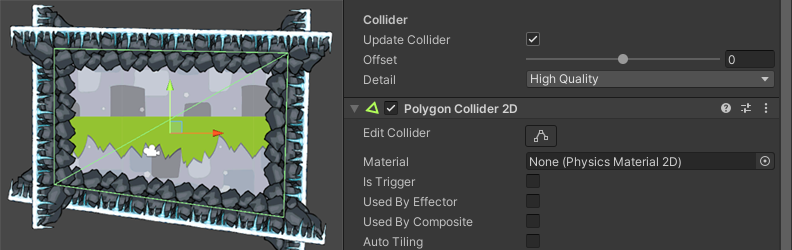
Edit the collider shape manually
By default, Unity reshapes the collider to match the sprite shape every time you edit the sprite shape. To edit the collider shape yourself, disable Update Collision in the Collision section of the Sprite Shape Controller component. Unity then stops updating the collider, so it doesn't overwrite your edits. While Update Collision is disabled, the Offset and Detail settings are hidden.